What is HTMX & How it Works for Server-Driven Web Interfaces?
“HTML was designed to explain user interactions. HTMX pushes that behavior back where it started, the markup itself."
This brings up a fundamental question: what is HTMX, and how does its server-driven approach transform modern web development?
To answer that, we need to step back and revisit how the web originally worked.
Web browsers were originally built around a model where the server produced HTML and the browser rendered it, forms were submitted, and links were navigated. That was the contract. Somewhere along the way, the industry decided that interactivity required JavaScript to intercept everything, construct the UI from JSON payloads, and maintain a parallel model of application state on the client. It felt like progress. It also added considerable weight.
HTMX makes a fairly pointed argument: most of the JavaScript you've been writing could have stayed on the server.
That's either a relief or a provocation, depending on where you sit. But it's worth examining carefully, because for a large category of real-world projects, HTMX has a strong case.
What is HTMX?
There is a small JavaScript library, barely 14 kilobytes, that has quietly become one of the more divisive tools in modern web development. It doesn't introduce a new component model. It doesn't require a build pipeline. It won't ask you to install anything from npm.
HTMX is a library that extends HTML with attributes to make HTTP requests, update parts of a page, and handle events, all without writing JavaScript yourself. A handful of hx-* attributes on your markup, and your server-rendered HTML becomes interactive. No React. No state management. No orchestration layer between your data and your UI.
The attributes are readable by design. hx-get fires a GET request. hx-target specifies where the response goes. hx-trigger defines when it happens. A vocabulary small enough to memorize, expressive enough to cover most cases.
php · HTMX class example
(new Htmx())
    ->post($form_url)
    ->onlyMainContent()
    ->select('#source-dependent')
    ->target('#source-dependent')
    ->swap('outerHTML')
    ->applyTo($form['source_dependent']['source']);
HTMX vs AJAX: Key Differences in Web Development
Consider a familiar scenario: a category filter that updates a content list without reloading the page. With traditional AJAX, the sequence looks like this: a JavaScript event listener fires, fetch() sends a request, the server returns JSON, JavaScript parses that JSON, builds DOM elements, and updates the page. Five steps of translation between what the server knows and what the user sees.
| Traditional AJAX Flow | HTMX Flow |
|---|---|
| JS event listener fires | hx-trigger fires |
| fetch() or axios sends a request | The browser sends a GET request |
| Server returns JSON | Server returns HTML |
| JS parses JSON | HTMX places HTML in the target |
| JS builds DOM elements | - |
| JS updates the page | - |
And the JavaScript you'd have to write for AJAX:
php · Drupal AJAX (the old way)
$form['source_dependent']['source'] = [
    '#type'  => 'select',
    '#title' => $this->t('Source'),
    '#ajax'  => [
        'callback' => '::updateSourceDependent',
        'event'    => 'change',
        'wrapper'  => 'source-dependent-wrapper',
    ],
];
Compare that with HTMX:
php · HTMX (the new way)
(new Htmx())
    ->post($form_url)
    ->onlyMainContent()
    ->select('#source-dependent')
    ->target('#source-dependent')
    ->swap('outerHTML')
    ->applyTo($form['source_dependent']['source']);
The AJAX approach asks "What data changed?" and HTMX asks "What should this section look like now?"
The key difference between HTMX and AJAX is that AJAX relies on JavaScript to process JSON and update the DOM, while HTMX allows the server to return ready-to-render HTML, reducing frontend complexity and improving maintainability.
HTMX Examples and Attributes Explained
You don't need to remember the full API. These cover most real-world use cases:
| Attribute | Purpose | Example |
|---|---|---|
| hx-get / hx-post / hx-put / hx-delete | HTTP method to use: get, post, update, and delete | hx-delete="/term/42" |
| hx-trigger | When the request fires | key up changed delay: 300ms |
| hx-target | Where the HTML response goes | #results, closest tr |
| hx-swap | How HTML is inserted | innerHTML, outerHTML |
| hx-include | Extra form values to send | closest form |
| hx-confirm | Confirmation dialog | hx-confirm="Sure?" |
| hx-indicator | Show loading element | #loading-spinner |
The hx-trigger attribute supports powerful modifiers. For example, keyup changed delay: 300ms only fires 300ms after the user stops typing and only if the value actually changed, a perfect debounce for live search with no extra code.
Using HTMX in Drupal: Integration in Drupal 11.3
Drupal is already a server-rendered framework. It generates HTML using Twig templates, routes requests through controllers, and manages assets via a library system. This architecture makes HTMX integration in Drupal both natural and efficient, as it aligns seamlessly with Drupal’s core patterns without introducing unnecessary frontend complexity.
HTMX support was first introduced in Drupal 11.2 and became fully featured in Drupal 11.3, bringing a native HTMX class that handles library attachment and attribute construction in a single fluent call. Early adopters of Drupal HTMX integration have reported reductions in JavaScript payloads of up to 71%, highlighting its effectiveness in optimizing frontend performance.
With HTMX in Drupal 11.3, developers can build dynamic, server-rendered interfaces without relying heavily on JavaScript frameworks. This approach makes HTMX Drupal integration particularly well-suited for admin panels, content workflows, and dynamic filtering systems where simplicity, maintainability, and performance are critical.
1. Load HTMX via the Library System
Drupal 11.3+: Using the Core Htmx Class
How you load HTMX depends on your Drupal version. Drupal 11.3+ HTMX ships with core. Use the native HTMX class, which attaches the library and builds all attributes in one step:
php · Drupal 11.3+ (core Htmx class)
use Drupal\Core\Htmx\Htmx;
(new Htmx())
    ->post($form_url)
    ->onlyMainContent()
    ->select('#source-dependent')
    ->target('#source-dependent')
    ->swap('outerHTML')
    ->applyTo($form['source_dependent']['source']);
Drupal 10 / 11 (below 11.3): Manual Library Registration
On older versions, HTMX isn't part of the core. Register it as an external library in libraries.yml, then apply hx-*; attributes directly in the Form API's #attributes keyy:
yaml · libraries.yml
htmx:
    version: 1.x
    js:
        https://unpkg.com/[email protected]: { type: external, minified: true }
2. Add hx-* Attributes to Your Form Elements
In Drupal's Form API, custom HTML attributes go in the #attributes key. HTMX attributes live here just like any other HTML attribute:
php · Form API (raw attributes, Drupal 10 / 11 below 11.3)
$form['vocab'] = [
    '#type'       => 'select',
    '#title'      => $this->t('Select Vocabulary'),
    '#options'    => $options,
    '#attributes' => [
        'hx-get'     => $terms_url,
        'hx-trigger' => 'change',
        'hx-target'  => '#terms-wrapper',
        'hx-include' => 'closest form',

    ],
];
$form['search'] = [
    '#type'       => 'textfield',
    '#title'      => $this->t('Search terms'),
    '#attributes' => [
        'hx-get'     => $terms_url,
        'hx-trigger' => 'keyup changed delay:300ms',
        'hx-target'  => '#terms-wrapper',
        'hx-include' => 'closest form',
        'placeholder'=> 'Search...',
    ],
];
hx-include="closest form" is the important one; it tells HTMX to include all form values with every request, including Drupal's hidden CSRF tokens. Without it, only the triggering element's value gets sent, and your filters won't carry over.
3. Return HTML from Your Controller
The route your hx-get points needs to return HTML, not a full Drupal page. A normal controller returning a render array does exactly this:
php · controller
public function loadTerms(Request $request) {
    $vid    = $request->query->get('vocab');
    $search = $request->query->get('search');
    // ... query your data ...
    // Drupal renders this, HTMX receives the HTML
    return [
        '#theme' => 'your_template',
        '#terms' => $terms,
    ];
}
Drupal handles routing, permissions, rendering, and caching exactly as it normally would. HTMX just decides which part of the page gets updated and when.
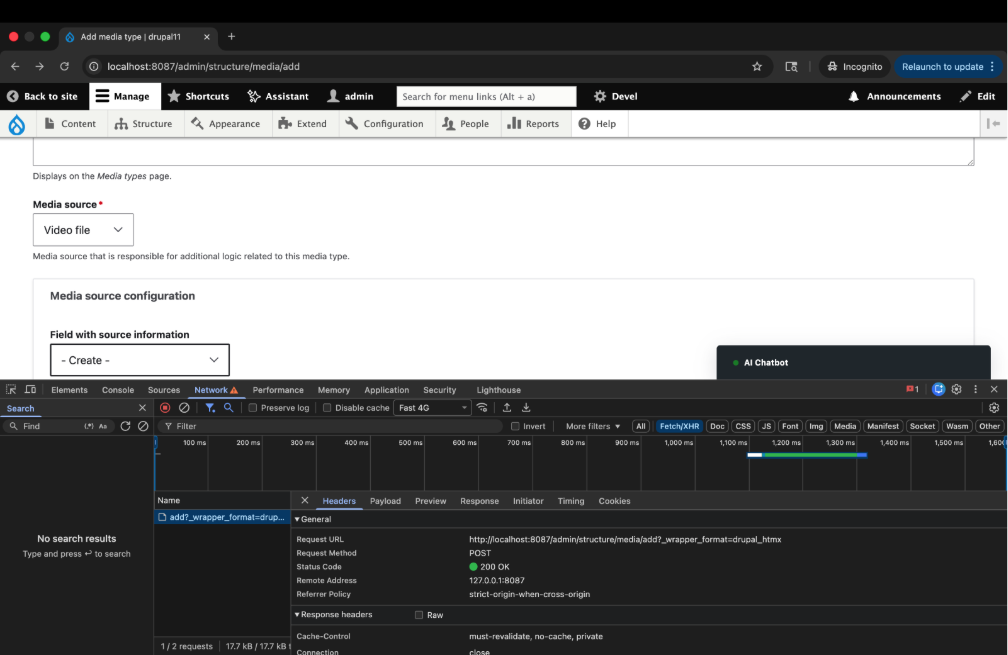
How to verify HTMX is working: Open DevTools → Network tab → interact with the form. You'll see a request like:
Pros and Cons: The Honest Assessment
Where HTMX Genuinely Helps?
- Dramatically less JavaScript. For server-rendered applications, a significant portion of JS is just shuffling data and updating the DOM. HTMX eliminates most of that.
- Debugging is transparent. Every HTMX request appears in the Network tab as a normal HTTP request. URL, parameters, HTML response, all visible.
- Faster development for CRUD interfaces. Admin panels, content workflows, filter-heavy listings, HTMX handles these faster than setting up a frontend framework and API layer.
- Natural fit for server frameworks. Drupal, Laravel, Django, Rails, if your framework already renders templates, HTMX fits the existing architecture.
- Lower maintenance over time. Less JavaScript means fewer dependencies, fewer breaking upgrades, and less onboarding for new developers.
Where HTMX Falls Short?
- Not designed for complex client-side state. If your UI needs to track interactions locally, drag-and-drop builders, multi-step forms with branching logic, and real-time collaboration, HTMX will make you work for it.
- Every interaction requires a server round-trip. For most admin tools, this is fine. For anything needing an instant, offline, or sub-50ms response, you’ll feel the latency.
- The server becomes responsible for the UI structure. This is actually the point, but it requires a mental shift. Your backend team needs to think about what HTML to return, not just what data.
- Animation control is limited. Smooth transitions require extra CSS work. HTMX doesn’t have an animation system built in.
To Sum Up
HTMX is closer to a correction. It questions whether JavaScript-heavy architectures were ever necessary for server-rendered applications. In practical terms, it enables dynamic, server-driven interfaces by letting HTML do more with far less reliance on complex JavaScript frameworks.
It won’t replace React for highly interactive, stateful applications. But for admin panels and content workflows, the bulk of what gets built, it removes a layer of complexity you likely didn’t need in the first place.
Looking to simplify your frontend and build server-driven interfaces with HTMX in Drupal? Let’s help you implement it the right way.
References:

Join Our Newsletter
Love open-source tech? Stay updated with projects that make a difference.