
What’s New in Drupal CMS 2.0: A Complete Overview
"Drupal CMS 2.0 marks a significant change in the construction of Drupal websites, integrating visual site building, AI-driven workflows, and enhanced performance on a robust enterprise platform."
“Drupal CMS is changing Drupal's story from powerful but hard to powerful and easy to use. With Drupal CMS 2.0, we're taking another big step forward. You no longer begin with a blank slate.” - Dries Buytaert
This shift in Drupal’s direction has been a long time coming. At DrupalCon Portland, Dries announced his plans for the first new version of Drupal CMS, named "Starshot," which was later released in January 2025.
This new version of the Drupal Core aimed to provide a ready-to-use experience for quickly building robust websites, making it easier for non-developers to use.
Moving forward with this legacy, last week, Drupal announced the launch of Drupal CMS 2.0, which it describes as the most significant advancement in the platform's history.
To fully take advantage of improved performance, modern tooling, and future-ready features, aligning your platform with Drupal 11 is your next step. Migrating to Drupal 11 ensures your site is ready for what’s next in the Drupal ecosystem.
Now, let's understand...
What is Drupal CMS 2.0?
More than two decades after Dries first began building Drupal, the platform now celebrates 25 years of continuous evolution.
This quarter-century journey, driven by relentless innovation, community dedication, and open-source collaboration, continues to shape Drupal into one of the world’s most trusted content management systems.
DrupalCMS 2.0, built on Drupal Core 11.3, offers the best performance improvement over a decade, which can handle 26-33% more requests using the same setup. Also, providing quick and dependable experiences that can grow from small businesses to large enterprises.
Drupal CMS 2.0 aims to "reinvent" the open-source CMS. It is created for marketers and content teams, especially those in mid-size and enterprise organizations that require a strong and dependable CMS to support their work. It also focuses on digital agencies, developers looking for AI-driven workflows, and teams with few technical resources.
What New Features Does Drupal CMS 2.0 Introduce?
Drupal CMS 2.0 is packed with features that reflect a clear shift in how Drupal sites are built today. The features discussed below show how the platform simplifies everyday tasks for marketers and content teams:
Drupal Canvas - Visual Site Builder
Drupal Canvas is the flagship feature of Drupal CMS 2.0, introducing a modern visual page-building experience that comes bundled with the CMS.
- Built-in Visual Page Builder: Drupal Canvas is included out of the box with Drupal CMS 2.0, making it the default way to build and edit pages visually.
- Drag-and-Drop Editing Experience: Users can easily drag and drop components onto a page, edit content directly in place, and undo changes instantly without switching between edit forms and preview screens.
- Complete Component Library: Drupal CMS includes a ready-to-use component library that works seamlessly with Canvas.
- Mercury Component Library: The specially designed Mercury library provides essential building blocks such as cards, testimonials, hero sections, menus, and accordions.
How to Use Drupal Canvas?
With Drupal Canvas, content and marketing teams can design pages freely and visually. Here’s a step-by-step example of how a homepage can be built using Canvas:
Step 1: Create or Open the Homepage in Canvas
- Start by creating a new page or opening your existing homepage.
- Choose Edit with Canvas to launch the visual editor.
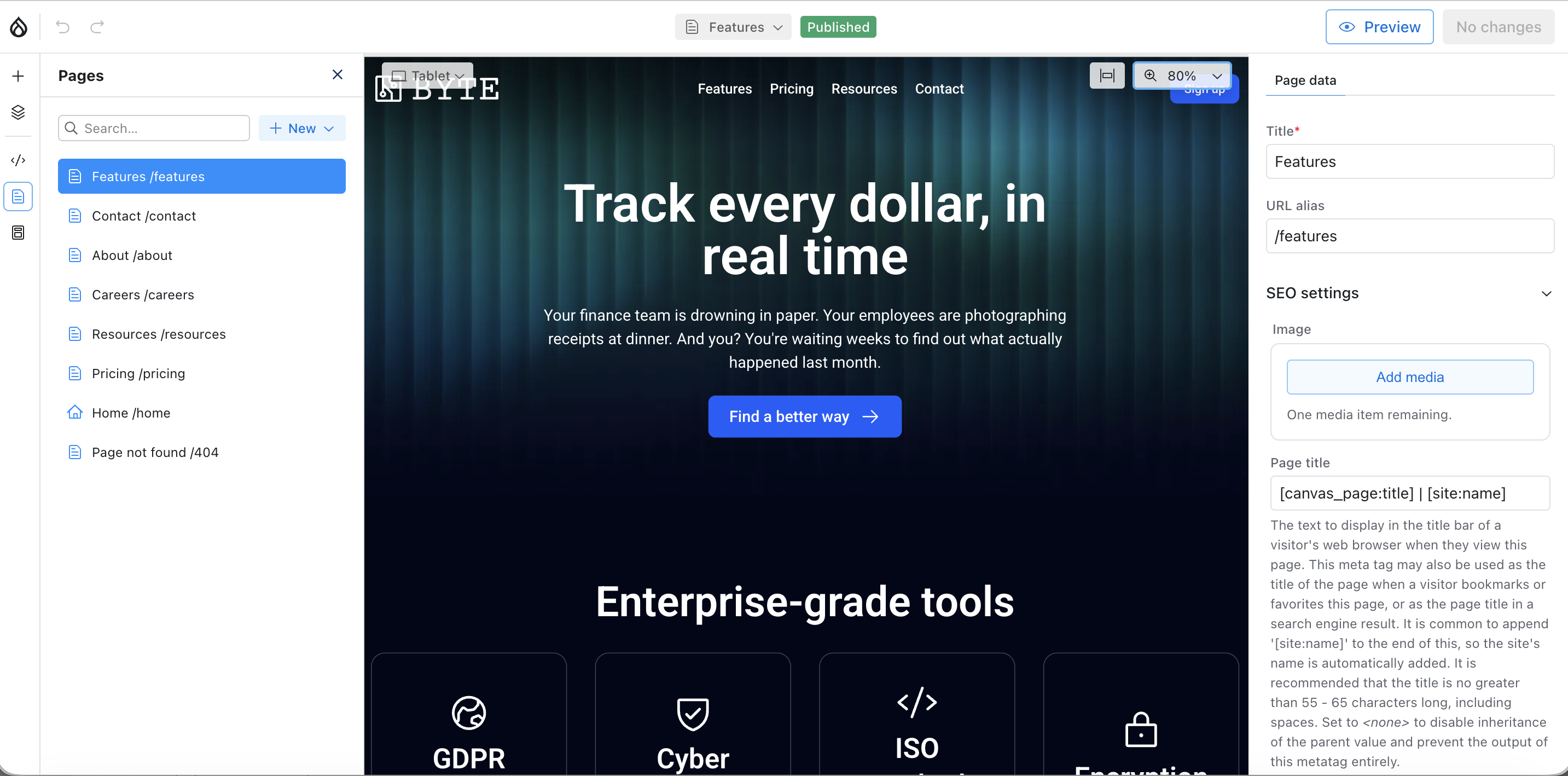
Step 2: Add a Hero Section
- From the component sidebar, drag a Hero component onto the top of the page.
- Use the properties panel to:
- Add a headline and subheading
- Upload or select a background image
- Configure the call-to-action button
Step 3: Preview the Layout Across Devices
- Use the built-in viewport switcher to preview the hero section on desktop, tablet, and mobile.
- Adjust spacing or alignment to ensure it looks good on all screen sizes.
Step 4: Build a Feature Section Using Cards
- Drag a Grid component onto the canvas below the hero.
- Add Card components into each slot of the grid.
- Update each card with:
- An icon or image
- A short feature title
- Supporting description text
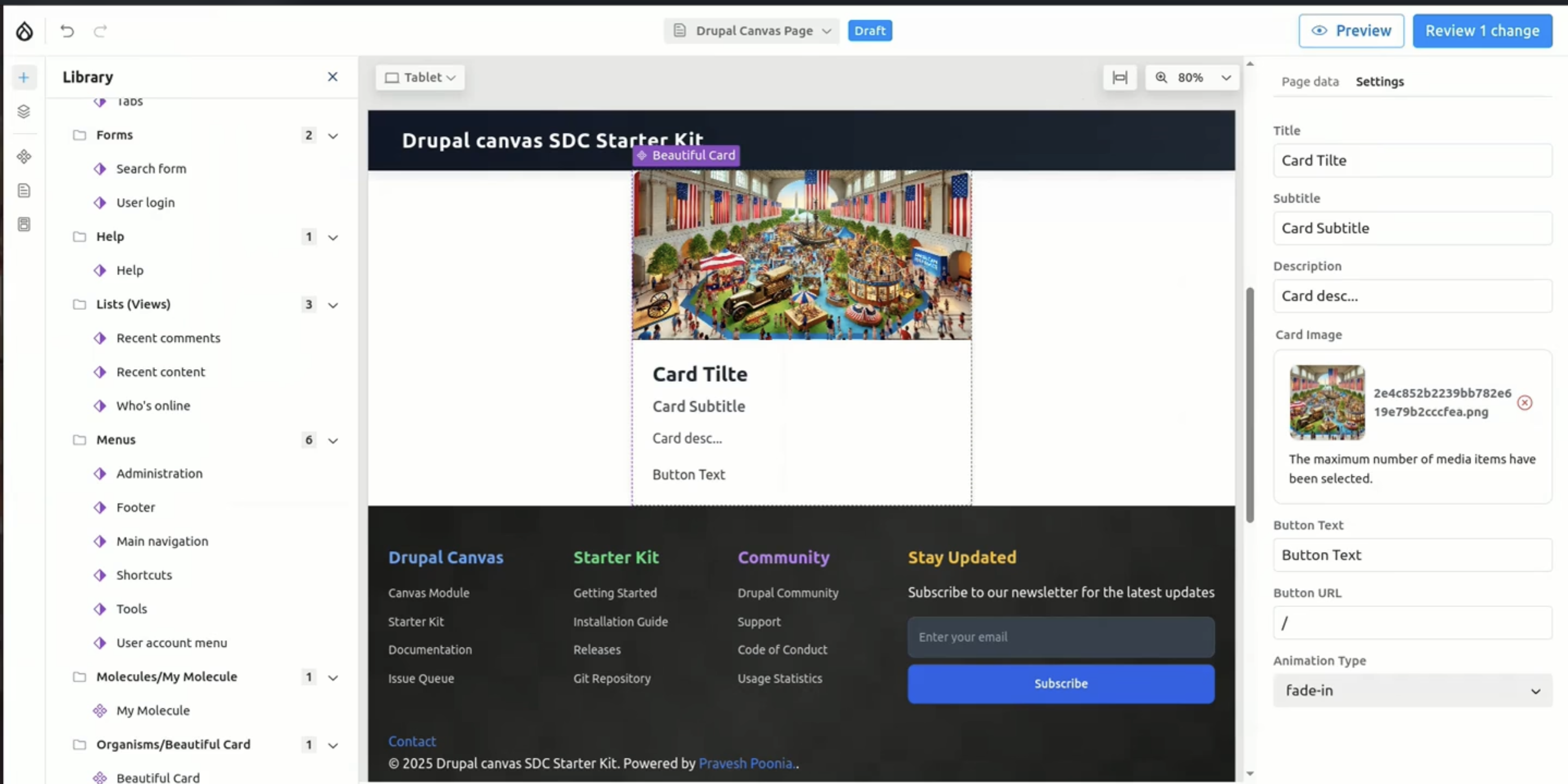
Step 5: Add a Testimonials Section
- Insert a Testimonials component below the feature section.
- Edit the content directly to add customer quotes, names, and roles.
- Rearrange or duplicate testimonials as needed.
Step 6: Connect Dynamic Content (Optional)
- Add a Blog Listing or Content Feed component.
- Use the JSON: API configuration to display the latest 3 blog posts automatically.
Step 7: Customize Styling
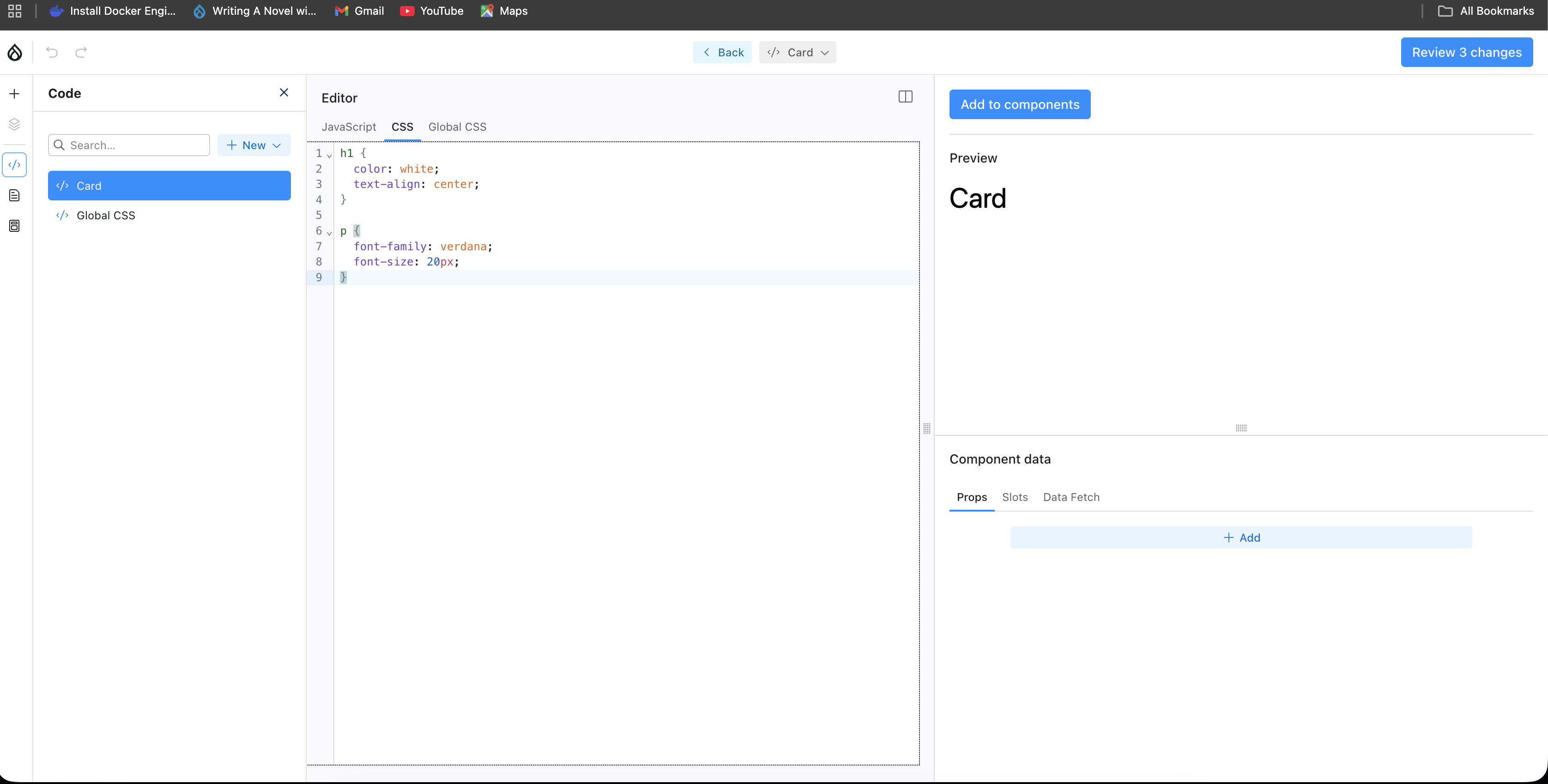
- For small adjustments, developers can tweak CSS or lightweight logic using the in-browser code editor.
- Any updates made here apply consistently across all uses of the component.
Step 8: Publish
- Once the homepage looks right, save and publish.
- The page is now live, responsive, accessible, and built entirely with reusable components.
Byte - Pre-Built Site Templates
Dries introduced the idea of Site Templates for Drupal during his keynote at DrupalCon Atlanta.
Site Templates basically merge Drupal recipes, a theme, design features, and pre-set content to provide users with a complete website from the beginning.
They address one of Drupal's major issues: the lengthy process of creating a site from the ground up.
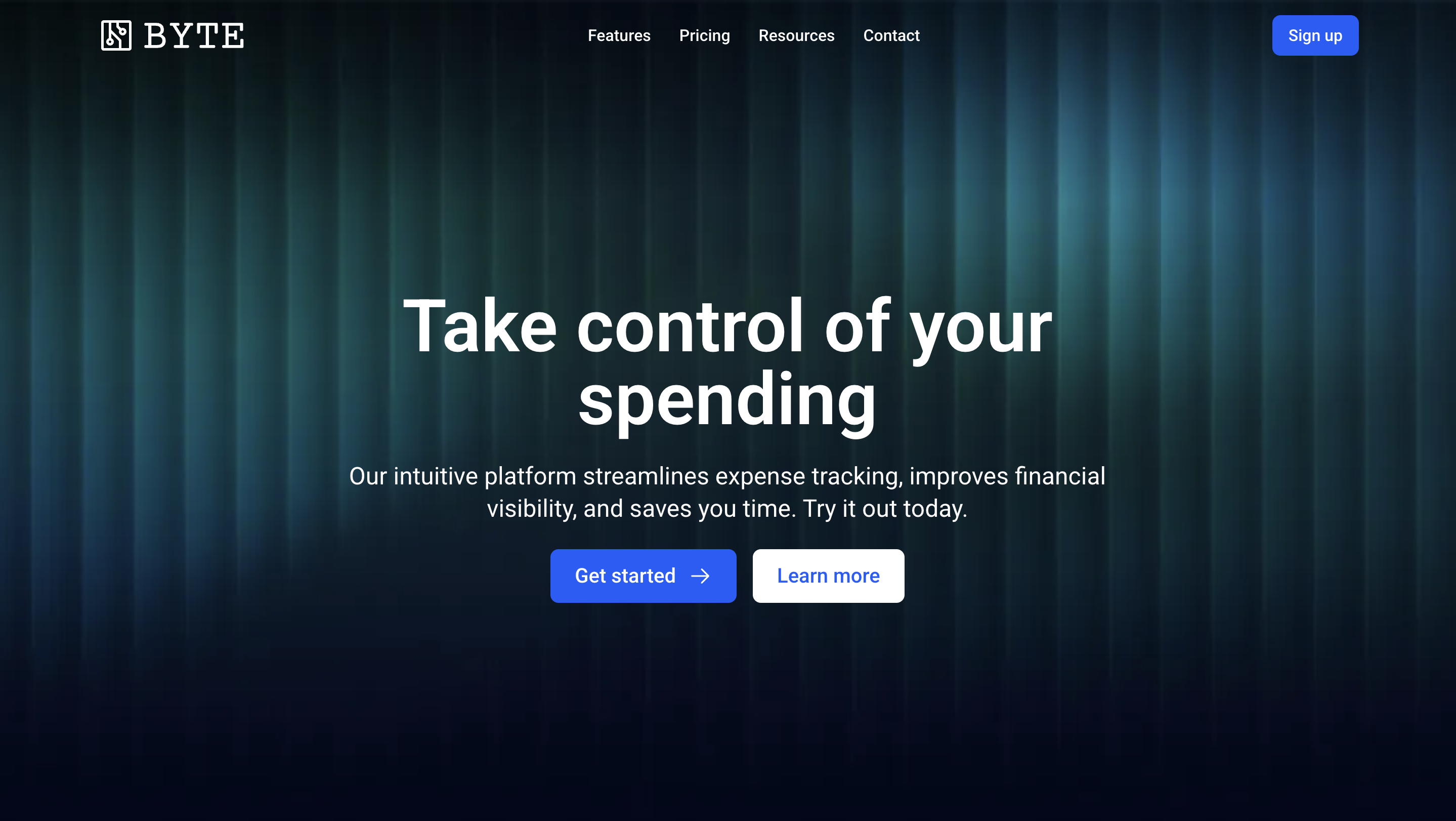
With the release of Drupal CMS 2.0, Drupal also released its first site template that comes with it, Byte. Byte serves as a fully equipped foundation for particular use cases.
This is set up as a marketing site for a SaaS product, featuring a blog, newsletter signup, pricing pages, and a contact form, all in an elegant dark design. Everything is created using Canvas. It installs in less than 3 minutes.
Optional AI-Powered Tools
Drupal CMS 2.0 offers optional features that make site building more efficient and accessible. They help teams save time on repetitive tasks while ensuring that decisions and oversight always remain human-led, an approach that aligns closely with how Drupal AI integration is evolving across modern Drupal projects.
- AI-Generated Pages: Create complete pages using simple text prompts, automatically assembling layouts with Canvas components for faster page creation.
- Admin Chatbot for Site Building: The built-in admin chatbot assists with tasks such as creating content types, defining taxonomy terms, and adding fields, helping teams move from intent to configuration more efficiently.
- AI-Assisted Alt Text for Images: Automatically generate alt text to improve accessibility across your site, with the option for human review and refinement before publishing.
- Centralized AI Dashboard: Manage all AI features from a single dashboard, including visibility into enabled tools and configured AI providers.
To understand how Drupal CMS 2.0’s optional AI features fit into day-to-day work, let’s look at a simple example of creating and managing a campaign landing page:
Step 1: Start with the Page Goal
A content or marketing team begins by defining the purpose of the landing page, such as promoting a new product, event, or campaign. This clarity helps determine where AI assistance can be useful, whether for drafting content, refining messaging, or improving accessibility.
Step 2: Use AI Assistance for Initial Content Drafting
While creating the page, editors can use AI tools to generate a first draft of headings, descriptions, or call-to-action copy based on a short prompt. This helps teams move faster from a blank page to usable content, which is then reviewed and refined by humans.
Step 3: Refine and Improve Content Quality
AI tools can suggest clearer wording, improved structure, or shorter summaries for key sections. Editors remain in full control, accepting, modifying, or rejecting suggestions to ensure the content aligns with brand tone and messaging.
Step 4: Improve Accessibility and Consistency
As images are added to the page, AI can assist by suggesting alt text descriptions. These suggestions help improve accessibility, but editors should review and finalize them to ensure accuracy and context.
Step 5: Support Administrative Tasks
For site administrators, AI tools can assist with organizing content, identifying missing fields, or streamlining repetitive configuration steps, reducing manual effort without automating critical decisions.
Step 6: Review and Publish
Before publishing, the team reviews the page end-to-end. Since all AI features are optional and assistive, the final output reflects human judgment, with AI simply accelerating the process.
Automated Integrations and Recipes
Developers have excelled in facilitating third-party integrations.
Drupal CMS 2.0 addresses this with recipe-based automation for Mailchimp, Google Analytics, Google Tag Manager, and AI, handling the challenging yet crucial details that marketers often struggle with.
Now, with one-click integrations, developers can easily set up complex configurations using straightforward prompts for credentials.
Drupal Recipes are designed to add ready-made functionality to an existing site based on your goals, without lengthy configuration. Follow the steps below to see how the Recipe can be used:
Step 1: Open Project Browser to Choose a Recipe
From your Drupal admin dashboard:
- Go to Extend
- Open Project Browser
This is where Drupal lists all available recipes in a clear, goal-oriented way, such as Events, SEO, Analytics, Accessibility, and AI, so users can easily find what functionality they want to add.
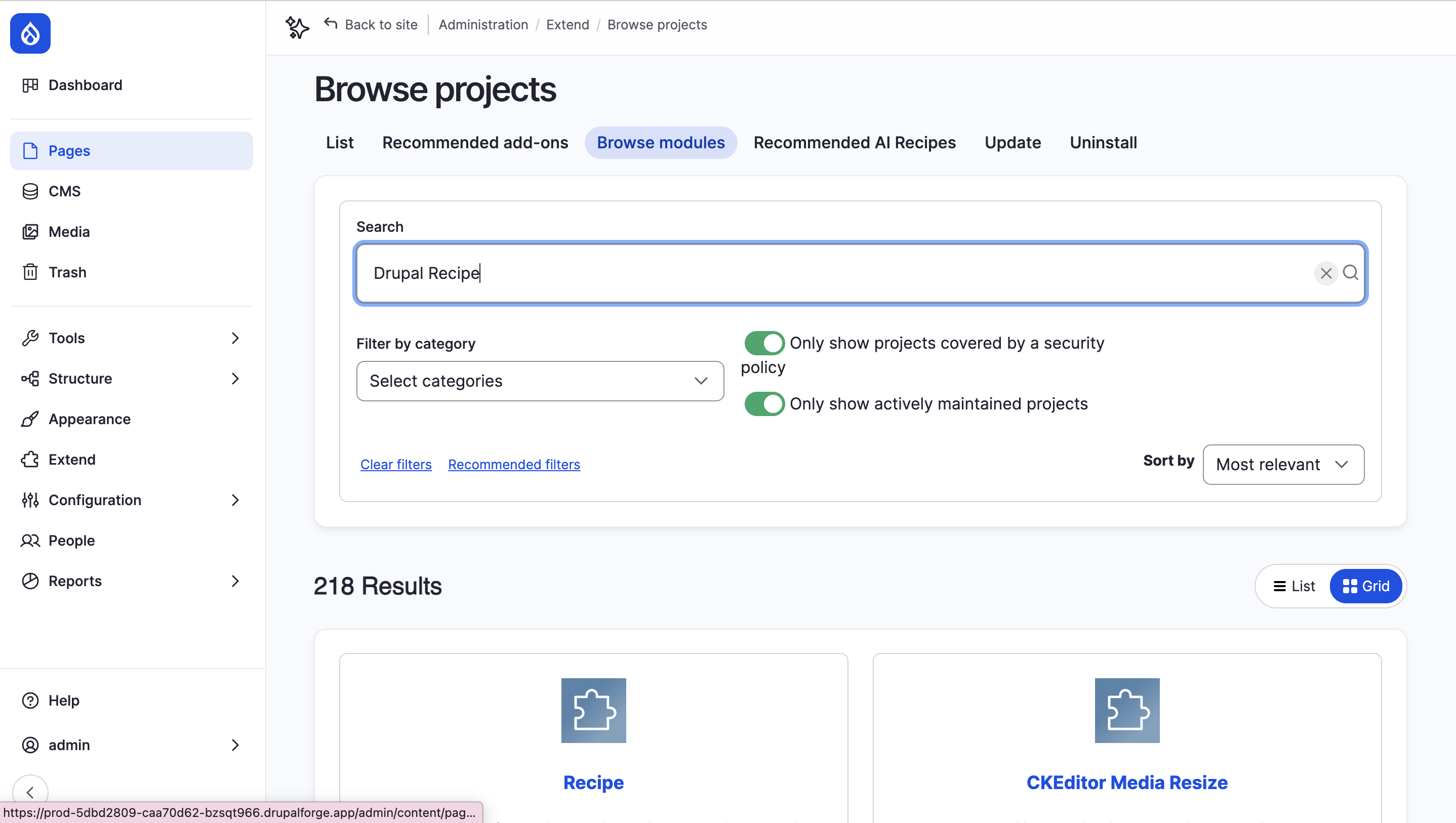
Step 2: Select the Recipe
Inside Project Browser:
- Browse the available recipes
- Click on a recipe (for example, Events)
Each recipe clearly explains what it adds to your site in non-technical language, making it easy for both developers and non-technical users to understand.
Step 3: Install the Recipe
- Click Install.
- Drupal will automatically:
- Installs required modules
- Creates content types and fields
- Configures views, layouts, and permissions
- No manual configuration is needed.
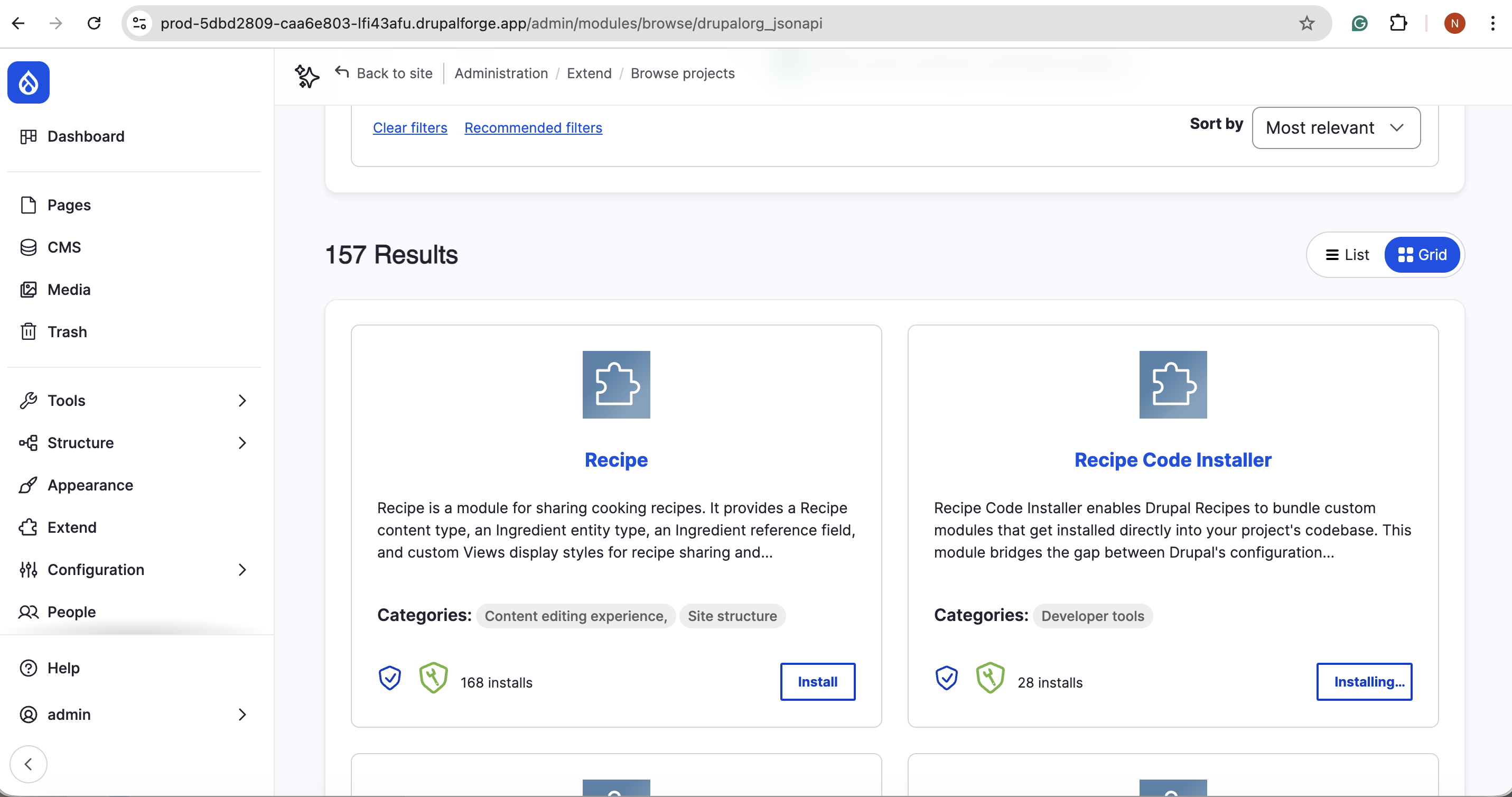
Step 4: Start Using the New Feature
- After installation, the new functionality appears right away.
- For example, with the Events Recipe, you’ll see:
- An Upcoming Events section
- An Add an Event button
- A fully configured event creation form
Step 5: Manage and Customize
- You can:
- Edit content
- Adjust layouts
- Add or remove recipes later
- Drupal also provides built-in documentation for each recipe, explaining what was installed and how to extend it.
How Is Drupal CMS 2.0 Different from Drupal CMS 1.0?
The table below outlines the evolution from Drupal CMS 1.0 to Drupal CMS 2.0, focusing on what’s changed:
| Basis | Drupal CMS 1.0 | Drupal CMS 1.0 |
|---|---|---|
| Overall Focus | Introduced the concept of a ready-to-use Drupal CMS | Refines and expands the vision with usability, performance, and AI |
| Page Building Experience | Relied mainly on traditional editing and layout tools | Drupal Canvas as the default visual page builder |
| Target Users | Primarily, developers and technical teams | Marketers, content teams, agencies, and developers |
| AI Capabilities | Minimal or experimental | Built-in optional AI tools (page generation, admin chatbot, alt text) |
| Configuration Experience | Manual setup and configuration | Faster setup using recipes, templates, and AI assistance |
Will Drupal CMS 2.0 Change How Websites Are Built?
Drupal CMS 2.0 marks a clear shift in Drupal’s evolution, complex setups, and collaborative site building. Developers can focus on structure and scalability instead of repetitive groundwork, while marketers and content teams gain the freedom to build, experiment, and publish with confidence.
For agencies and cross-functional teams, this balance of control and flexibility streamlines delivery and improves collaboration. If we look at it overall, Drupal CMS 2.0 positions Drupal as a modern, visual, and AI-ready platform without losing the enterprise strength it’s known for.
Drupal CMS 2.0 offers exciting new opportunities. Our Drupal services assist you in planning, building, and scaling with assurance.
Join Our Newsletter
Love open-source tech? Stay updated with projects that make a difference.