
Drupal AI Ecosystem Part 6: ECA Module & Its Integration with AI detail
Modern Drupal sites demand automation, consistency, and predictable workflows. With Drupal’s ECA module, these capabilities become easier and more visual than ever. Whether it's moderating content, sending notifications, generating metadata, or orchestrating multi-step processes, developers and site builders often end up writing custom hooks or glue code.
The ECA module serves as Drupal’s modern workflow automation engine that brings no-code, BPMN-based, and highly extensible process building directly into the site-building layer. It replaces the traditional “write a custom module for everything” approach with a visual, rule-driven system.
In this blog post, we’ll break down what the Drupal ECA module is, how it has evolved, and how it enables automation without writing code, highlight its key strengths and limitations, discuss the AI Integration into the Drupal ECA module, and more.
Before proceeding, take a moment to check out our services, particularly if you need a team that focuses on creating AI-powered Drupal experiences that combine innovation with responsibility.
Now, let’s break down...
What Makes the Drupal ECA Module Transformative for Drupal?
ECA stands for Event Condition Action. The Drupal ECA module is a no-code tool that lets you manage your Drupal site. It is a strong, flexible, and easy-to-use rules engine for Drupal. The main module acts as a processor that checks and runs event-condition-action plugins. With the graphical user interface BPMN.iO, ECA provides a solid framework for creating action sets that are triggered by specific conditions. The ECA module represents the basic rule engine pattern:
- Event: Something happens in Drupal (node saved, user logs in, cron runs…).
- Condition: Check if certain criteria match (content type, user role, field value…).
- Action: Execute a task (send email, update entity, call API, create node…).
This logic is modeled visually using BPMN 2.0, making workflows
- Easy to understand,
- Easy to maintain,
- And fully no-code for most standard processes.
At the heart of this visual modeling experience is bpmn.io, a powerful browser-based editor that lets you create and modify BPMN diagrams with ease.
Built and battle-tested by Camunda, bpmn.io is part of their core product ecosystem and comes with extensible, embeddable, and fully open-source libraries available on GitHub, making it an ideal foundation for Drupal’s ECA-driven workflow editing.
Also, Check Out:
- Drupal AI Ecosystem Part 1: Setup and AI CKEditor Configuration
- Drupal AI Ecosystem Part 2: AI Logging, Observability, & API Explorer
- Drupal AI Ecosystem Part 3: Drupal AI Translate Module
- Drupal AI Ecosystem Part 4: Drupal AI Search with PostgreSQL Vector Database
What Environment and Module Stack are Required for Drupal 11, ECA, and AI?
The following example assumes a modern Drupal 11 site with the following key packages installed:
- Workflow and modeller layer
- drupal/eca:^3.0 - main Event-Condition-Action engine.
- drupal/bpmn_io:^3.0 - BPMN.iO modeller, providing the graphical UI for ECA models.
- AI and OpenAI integration
- drupal/ai:^1.2 - unified AI framework (providers, tasks, pipelines).
- drupal/ai_provider_openai:^1.2 - OpenAI provider implementation for the AI module.
- drupal/ai_integration_eca:^1.0@RC - bridges AI’s tasks into ECA actions (AI steps inside workflows).
How to Set Up ECA with BPMN.io for Workflow Automation?
With eca and bpmn_io enabled,
Enable the right submodules
From Extend (or via Drush), ensure:
- Core ECA pieces:
- ECA, ECA Base, ECA Content, ECA User, ECA Form (and any others you need, like Views, Workflow, Config).
- Modeller UI:
- BPMN.iO modeller.
- AI integration:
- AI, AI Provider OpenAI, and AI Integration ECA.
This combination automatically exposes all available events, conditions, and actions from ECA, AI, and OpenAI into the BPMN modeller’s template dropdowns.
Accessing the modeller
On this stack, site builders configure workflows here:
- Go to Configuration → Workflow → ECA (/admin/config/workflow/eca).
- Click “Add new BPMN.io model” to open the BPMN.io canvas.
- Use:
- Events (circles) → start/trigger elements (e.g., “After content entity saved”).
- Gateways (diamonds) → branching and conditions (role, bundle, field value, etc.).
- Tasks (rounded rectangles) → actions (send email, set field, AI call, etc.).
The right‑hand property panel lets you select Templates for each element; those templates are ECA plugins provided by eca, ai_integration_eca, and any other modules.
What Events and Actions Can be Used with Drupal ECA?
With the ECA module on Drupal, your website has three important plugin families: events, conditions, and actions.
Key event types
- Content entity events (ECA Content)
- After an entity is created
- After an entity is updated
- Before or after an entity is deleted
- Scoped to specific entity types (node, user, media, taxonomy term, etc.)
- User/account events (ECA User)
- User created/updated/blocked/unblocked.
- User logs in / logs out.
- Form events (ECA Form)
- Form built, validated, or submitted (Node forms, Webforms, custom forms).
- System and scheduled events
- Cron run (scheduled workflows such as newsletter summaries and AI batch tagging).
- Config saved/imported, queue item processed, and contrib‑specific events (e.g., external integrations).
Core actions
- Entity actions
- Create entity (nodes, media, terms, users).
- Update fields on the current entity (set text, references, booleans).
- Delete entities or trigger workflow transitions (publish, unpublish).
- Messaging and logging actions
- Send email (using Drupal’s action API, wired through SMTP).
- Show a message to the current user.
- Write entry to log (watchdog).
- System, cache, and Views actions
- Read/write configuration values.
- Invalidate cache tags/cache items.
- Execute a View and iterate over its rows in a process.
AI actions (from AI Integration ECA + OpenAI provider)
Because we are using drupal/ai, drupal/ai_provider_openai, and drupal/ai_integration_eca, we get AI tasks that appear as action templates inside BPMN.io.
- Generate or transform text
AI “Chat” / “Completion” actions that:- Take a prompt with tokens (e.g., [node: title] and [node: body]).
- Call the configured OpenAI model.
- Return text that you can map into a field (field_seo_summary, field_keywords, etc.).
- Summarisation and classification
- Summarise a long text (generate 40-50-word SEO summaries).
- Classify sentiment or detect toxicity for moderation flows.
- Enrichment and rewriting
- Extract keywords or tags.
- Improve grammar, adjust tone (formal/casual), and generate alt text.
How Does a Basic ECA Workflow Work in Drupal?
Let’s walk through a typical ECA module workflow that most Drupal sites can relate to.
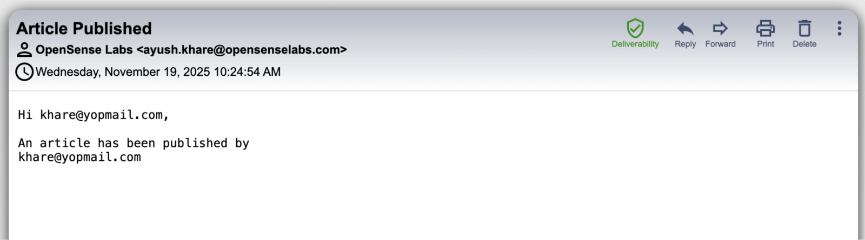
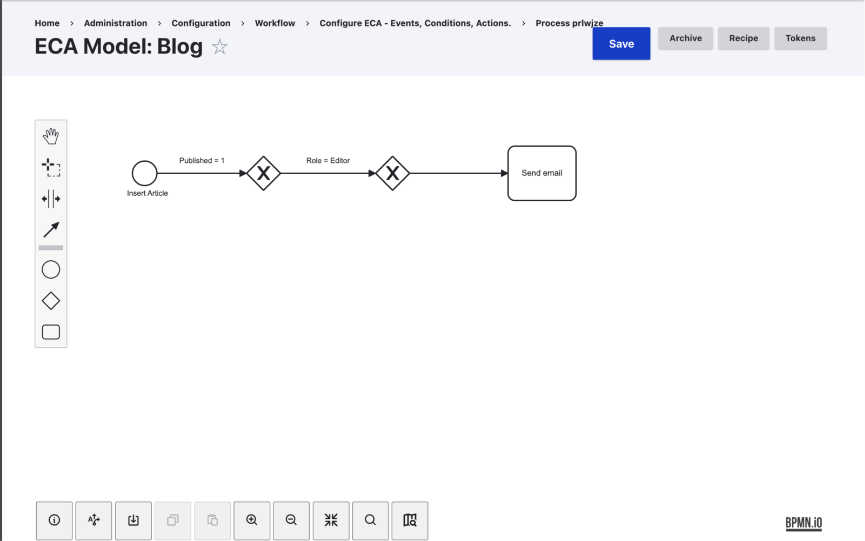
Use Case: Auto-email Editors When an Article Is Published
Goal: When an editor publishes an article, send a notification email to the editorial lead.
Step-by-step Breakdown
- Event
- Choose Entity: After Save (node)
- Trigger only when "status = published".
- Only for content type "article".
- Condition
- Check:
- node:bundle == 'article'
- node:status == 1
- current_user:has_role('editor')
- Check:
- Actions
- Generate an email message using tokens
- Send an email to the configured editorial lead
Technical Mapping Inside ECA
| Component | ECA Element |
|---|---|
| Trigger on publish | Start Event -> Entity After Save |
| Check conditions | Exclusive Gateway + Conditions |
| Send email | Action: Send Email |
Result
A fully automated workflow triggered exactly when needed without writing a single line of PHP. This represents the baseline power of the Drupal ECA module.
What are the Strengths and Limitations of Drupal ECA?
The table below outlines the key strengths and limitations of Drupal ECA, helping teams assess its suitability for different workflow automation and orchestration use cases.
| Strengths | Limitations |
|---|---|
| Zero-code workflow automation | Complex logic can get visually dense |
| BPMN diagramming for better transparency | Hard to debug very large BPMN diagrams |
| Exportable YAML definitions for dev/stage/prod syncing | Performance impact if workflows are too granular or event-heavy |
| The plugin ecosystem allows extensibility | Synchronous actions may slow down UI operations |
| Handles complex, multi-step workflows easily | Requires training to use BPMN effectively |
| Great for editorial, governance, access control, and content moderation flows | Some workflows may still require custom plugins or event subscribers |
What Happens When AI is Introduced to ECA?
Once you understand ECA’s capability, the next natural question is, “What if the Action step could use intelligent decision-making?”
This is precisely where AI Integration ECA is relevant. Using the AI contrib module and the plugin bridge from AI Integration ECA, you can easily integrate AI-driven actions into your ECA workflows, allowing for smarter and more dynamic automation than ever before.
What AI Adds
- Automatic content generation (SEO text, summaries, metadata)
- Classification (toxicity detection, sentiment analysis)
- Transformation (tone rewriting, grammar correction)
- Enrichment (alt text generation, tagging, keyword suggestions)
- Content moderation checking
In workflows where logic is predictable but content is dynamic, AI enhances ECA by transforming it from a purely rule-based system into one that is context-aware and adaptive.
How Can AI be Integrated into ECA Workflows?
By combining AI capabilities with ECA, workflows can move beyond static rule execution to more adaptive, context-aware automation. The following example illustrates how an AI action can be added inside an ECA workflow:
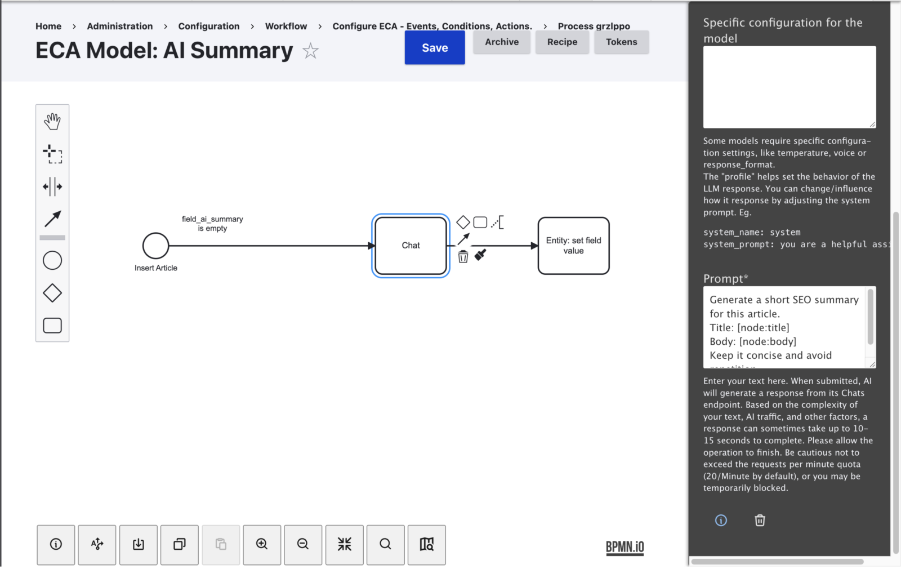
Use Case: Auto-generate SEO Summary Upon Article Save
Event: Entity saved (node)
Condition: Node is an article and Field field_seo_summary is empty.
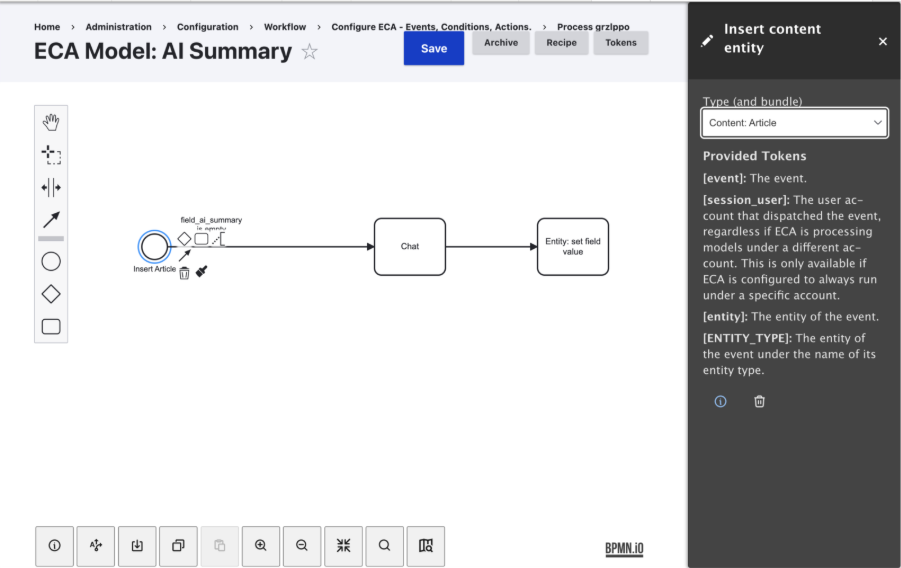
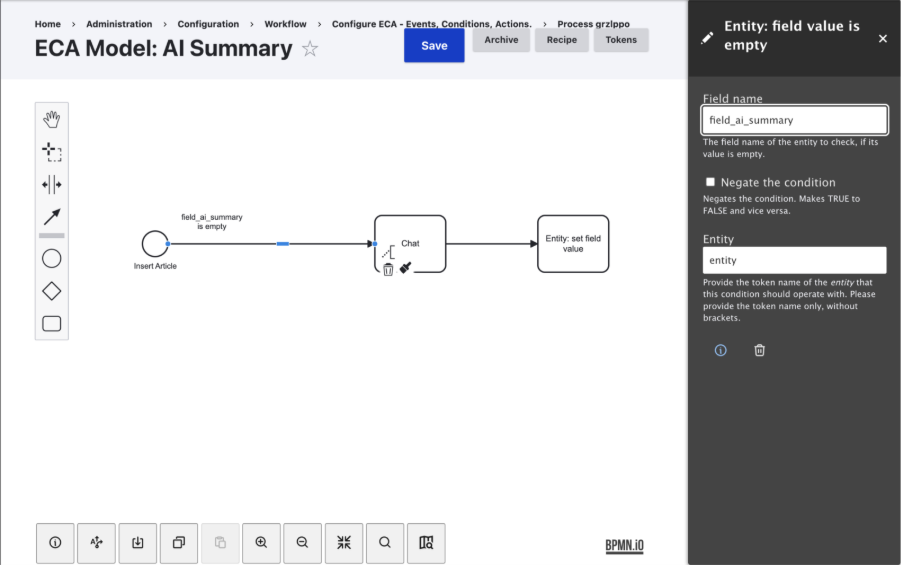
AI Action: This action calls an LLM to analyze the content and produce a 40 to 50-word SEO-optimized summary, which can be stored or reused across metadata fields.
Prompt example: Generate a short SEO summary for this article.
- Title: [node: title]
- Body: [node: body]
Keep it concise and avoid repetition.
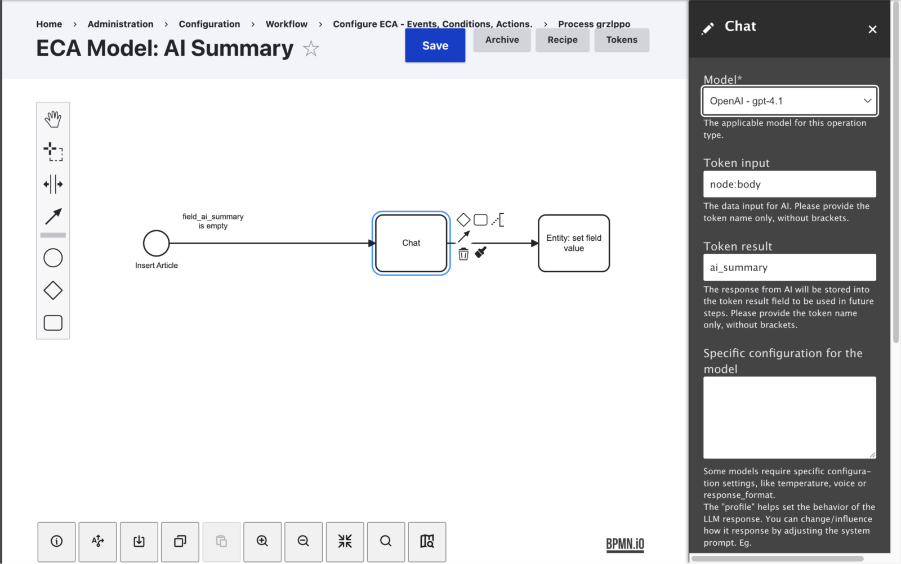
Set Field Action: Map AI output - node:field_seo_summary
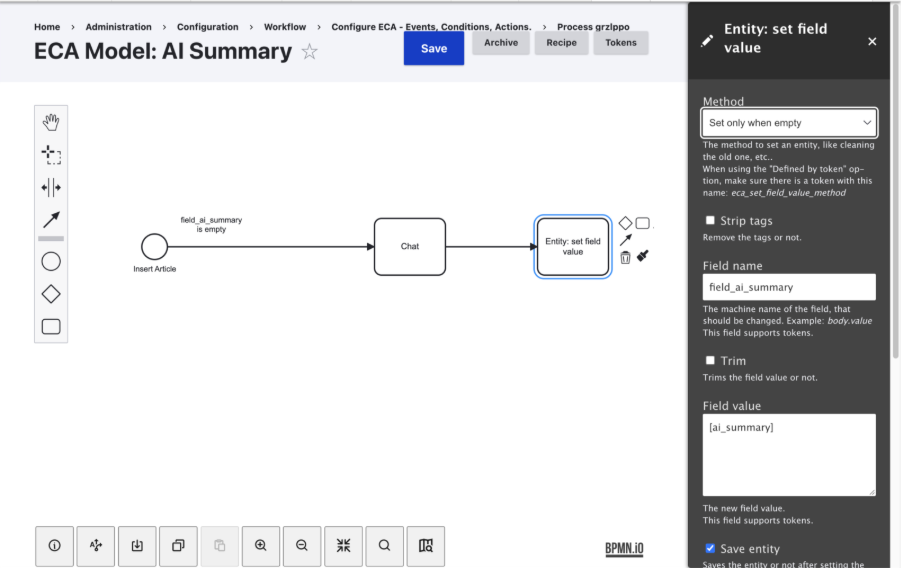
Save Entity
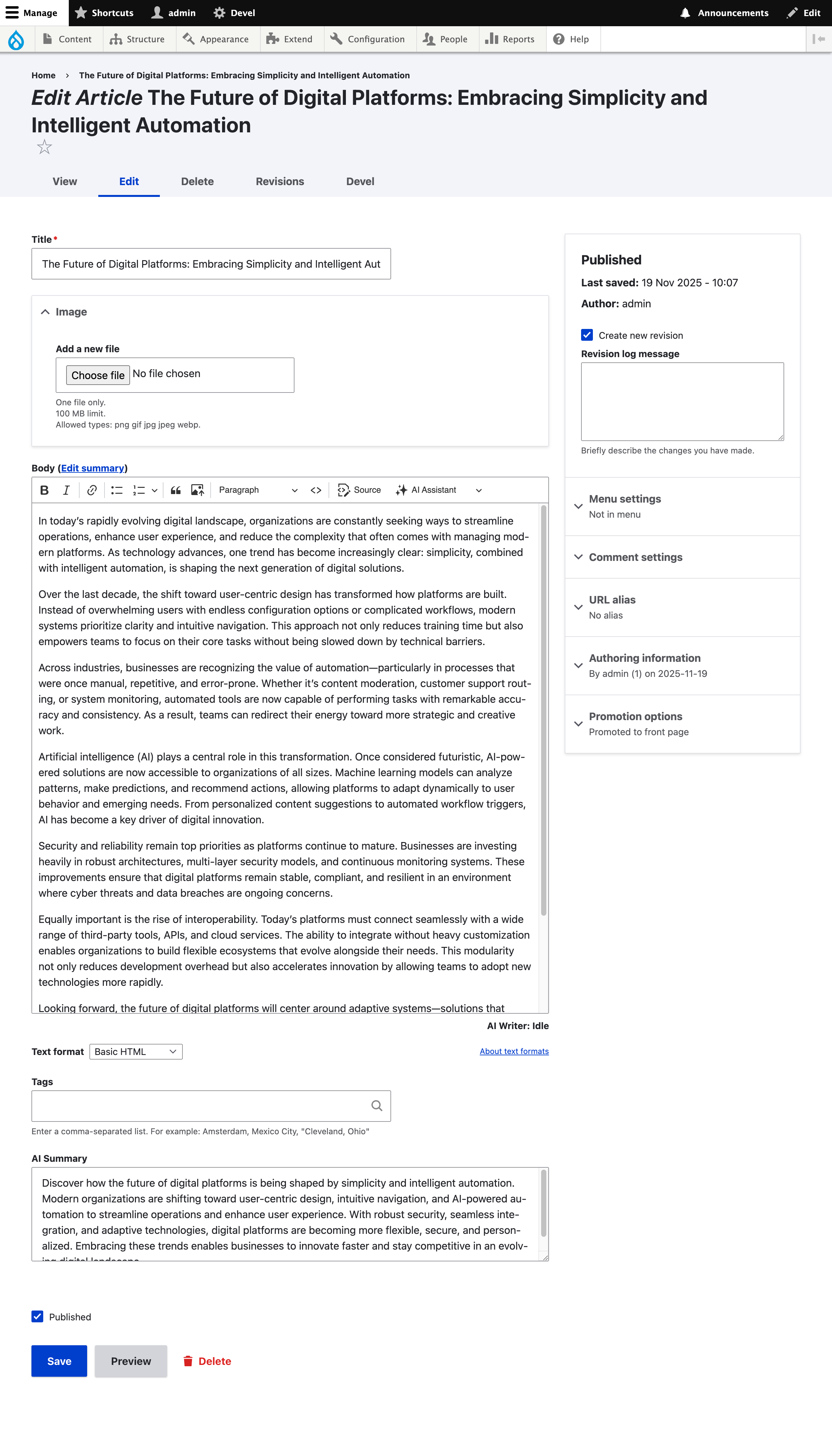
Outcome
Editors can generate LLM-powered SEO summaries with minimal manual effort.
Some Additional Examples
Beyond single-step actions, Drupal ECA can orchestrate multiple AI-powered workflows that automate and enhance content operations:
- Automatic Content Tagging: AI extracts relevant keywords from articles, which ECA then maps to existing taxonomy terms, ensuring consistent and scalable content classification.
- Content Tone Transformation: Editors can select an option like “Make formal” or “Simplify language,” triggering an ECA workflow that calls an AI rewrite action to adjust tone without altering meaning.
- AI-Assisted Content Moderation: When AI detects hate speech or policy violations in comments, ECA can automatically unpublish the content and flag it for editorial review.
- Automated Newsletter Generation: A scheduled cron event triggers ECA to fetch the latest published articles, invoke AI to generate summaries, and automatically send the compiled newsletter via email.
Drupal’s ECA module already offers a robust, visual, and extendable automation system. But when paired with AI through the AI Integration ECA module, it becomes a powerful intelligent workflow engine capable of producing, validating, and enriching content at scale.
This combination empowers everyone across the Drupal AI ecosystem, editors, site builders, and developers alike, while also enabling organizations to achieve automation with higher quality, greater efficiency, and built-in intelligence.
Key Takeaways
- Drupal ECA introduces a powerful no-code, BPMN-based workflow builder that simplifies and automates complex Drupal processes.
- With its Event Condition Action approach, ECA replaces scattered custom hooks with a clear, visual, and maintainable rules engine.
- The module’s evolution brings stronger extensibility, YAML export/import, and seamless integration with Drupal and Symfony events.
- Adding AI actions to ECA enables intelligent automation like content generation, moderation, enrichment, and SEO optimization.
- The combination of ECA and AI empowers editors, site builders, and developers to deliver smarter, faster, and more efficient Drupal workflows.

Join Our Newsletter
Love open-source tech? Stay updated with projects that make a difference.