



Architecture Capsules by Vid: A loveable and fast search experience for your Drupal site


Do you need business search applications and enterprise features for your digital business? Elasticsearch, in combination with Drupal 8, can be a perfect fit. This edition of Architecture Capsules brings you the valuable tips and tricks on implementing Elasticsearch with Drupal.

Business use case and benefits
Implement a user friendly and modern search experience in low turn around time and in budget.
Requirement criteria
1. Search should allow users an easy way to drill down content. (Read facets)
2. Search experience should be super fast. (Read Decoupled / elastic)
3. Should work seamlessly with Drupal content.
Stack used
Drupal 8, ElasticSearch, React, Elasticsearch connector module, Searchkit (It is a suite of React components that communicate directly with your Elasticsearch cluster).
Architecture notes
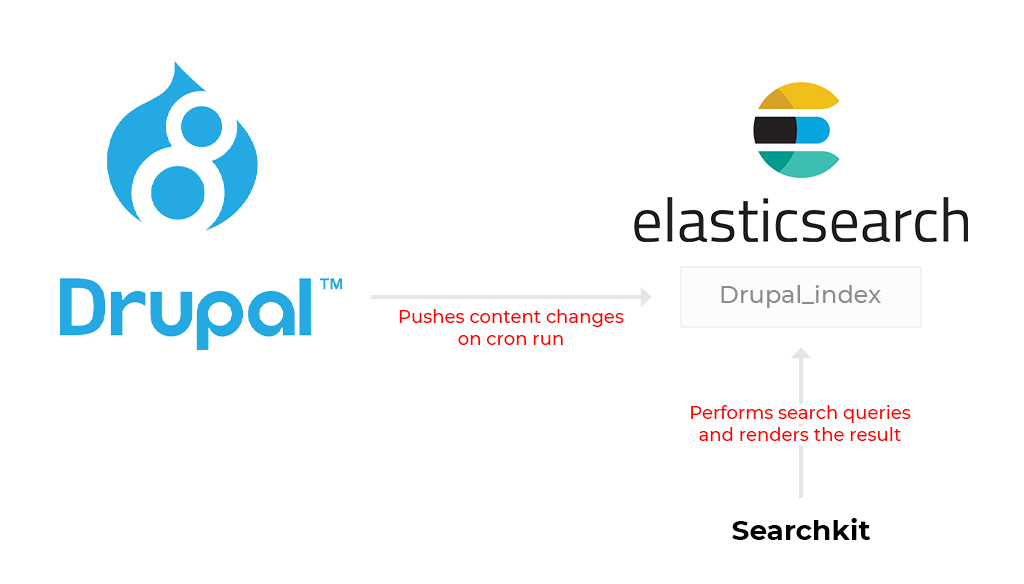
1. Configure the elasticsearch connector module on your Drupal 8 site to connect and index your content in elastic search. This link might be useful for further read on this.
2. Use npm to install searchkit.
3. Configure searchkit to make connection to elastic server. For more information, read here.
4. Make sure to check if you need to proxy the connection to elastic or not. In case you do, SearchKit has a plugin (Searchkit-express) which does that easily.
5. Generate the build of searchkit. Integrate the build with empty target container div in a drupal block or your theme.
5. More customisations and custom extentions for searchkit can be written. Follow the decently wide documentation it has.
Things to watch out for (Read Caution!)
The components in Searchkit require elasticsearch fields indexed in a particular way. For example, the Hierarchical Menu needs data to be indexed in levels. See Indexing & Mapping Guide or the component's pages for more information. You might need to add custom fields indexed in particular way from a custom Drupal module.
Subscribe
Related Blogs
What is HTMX & How it Works for Server-Driven Web Interfaces?

“HTML was designed to explain user interactions. HTMX pushes that behavior back where it started, the markup itself." This…
DrupalCon Chicago: Key Product & AI Updates

“The DrupalCon Chicago keynote looks back at Drupal’s 25-year journey while outlining how the platform is evolving. It…
DrupalCamp Delhi Returns After 6 Years: Here’s What to Expect
“After the COVID period, this marks the first time the camp is returning to Delhi. Over the years, the camp and the local…