
Drupal AI 1.4.0 Release: Key Updates for Enterprises
In the Drupal AI 1.4.0 release, Marcus Johansson, who maintains the module, said the project has reached a level of maturity where it now supports broader AI development workflows, not just features aimed directly at end users.
Drupal AI 1.4.0 was released on 1 June 2026, two months after version 1.3.0.
This release also arrives close to Drupal core's own 11.4.0 release, published on 1 July 2026. Drupal core 11.4.0 focuses on performance, including fewer database queries and faster recipe-based site installs, as well as an early version of a new command-line tool. It does not add AI features.
Drupal AI is a separate, actively developed project that runs on top of Drupal core. Both releases arriving close together show that a large amount of current Drupal development is going into performance and AI capability at the same time.
This article explains what changed in Drupal AI 1.4.0, in plain terms, and what each change means for a team running Drupal at enterprise scale.
How was Drupal AI 1.4.0 Built on 1.3.0?
Drupal AI 1.3.0, released in March 2026, was described by its maintainers as the largest feature update since the module began. It introduced three things:
- A first version of guardrails checks that ran on requests and responses before they reached an AI model or before they reached the site.
- Production monitoring through OpenTelemetry, so teams could track AI usage and cost using the same monitoring tools they already use elsewhere.
- Field Widget Actions, one-click AI actions built directly into content editing fields, such as generating an image from a prompt or building an FAQ from existing content.
Drupal 1.4.0 version does not replace this work. It takes the same three areas and makes each one ready for larger production use.
- Guardrails, which in 1.3.0 checked requests and responses individually, can now be applied globally across a whole site and can check streaming responses as they are being generated.
- Automators, which already existed to connect fields to AI actions, can now run across thousands of items at once instead of one at a time.
- And where 1.3.0 focused on giving teams visibility into AI activity, 1.4.0 adds a way to act automatically when something goes wrong through the new failure-handling system.
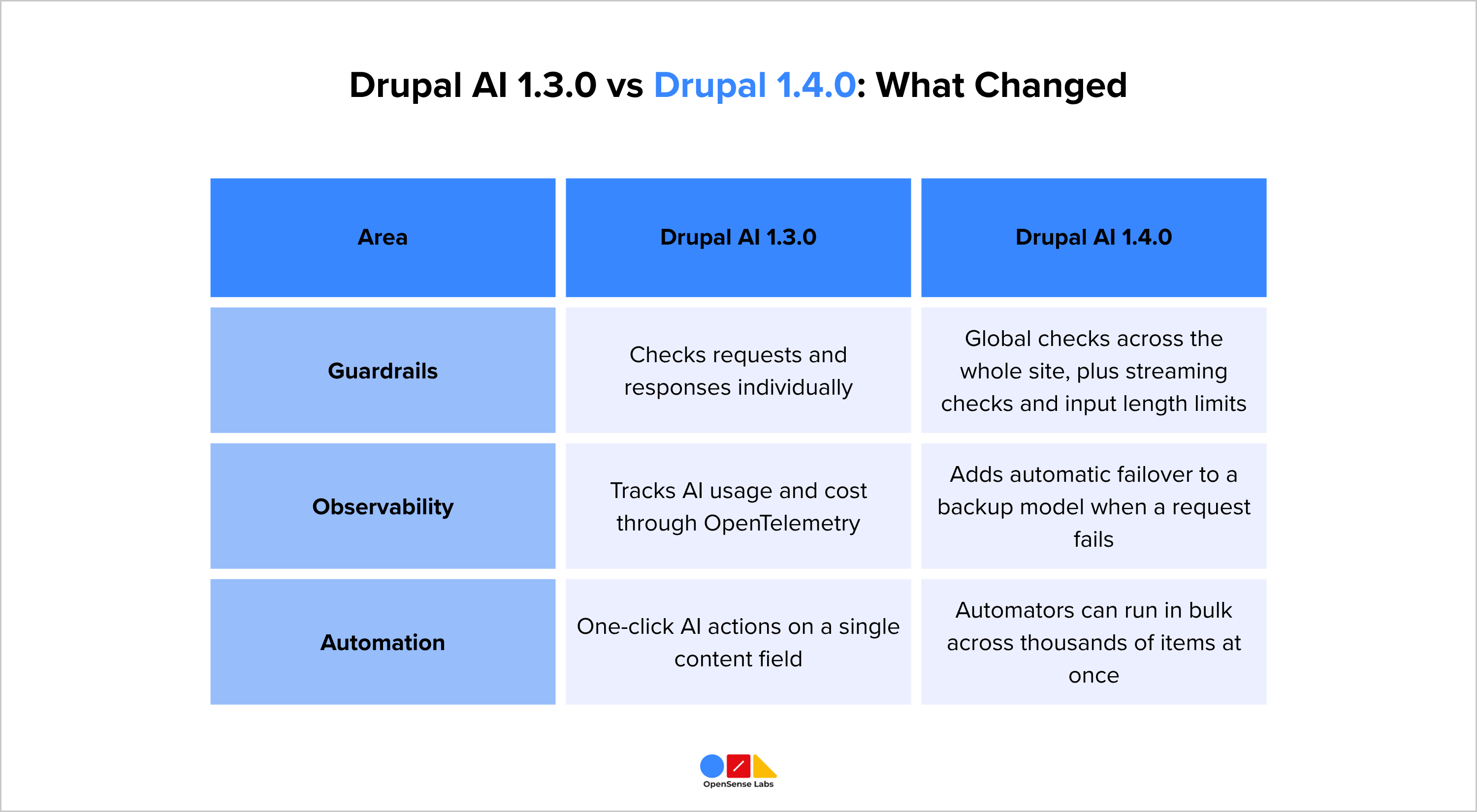
In short, 1.3.0 laid the foundation for governance and editorial AI, and 1.4.0 scales that foundation to enterprise-level traffic and content volume.
Now, let's have a detailed view of each of the features Drupal AI 1.4.0 has covered...
Guardrails and Safety
As more of a site starts to use AI, it becomes harder to control what the AI is allowed to generate and where those controls are applied. Drupal AI 1.4.0 adds three new types of checks to address this:
- Global Guardrails: Apply automatically across every part of a site that uses AI. Before this release, a check had to be set up separately for each AI feature. Now, one rule can be set, and it will apply everywhere AI is used on the site, including features added later.
- Streaming Guardrails: Check AI responses while they are still being generated, word by word, rather than only after the full response is complete. If a response starts to include something unsafe, the system can stop it before it reaches the person reading it.
- Input Length Limits: Control how much text can be sent to the AI in one request. Without a limit, someone could send an extremely large request on purpose, which raises cost without adding value. This is sometimes called a denial-of-wallet attack. A length limit reduces this risk.
Together, these checks mean a site does not depend on each editor or developer remembering to add safety rules by hand. The checks run automatically, as part of the system.
AI Automators Running as Bulk Actions
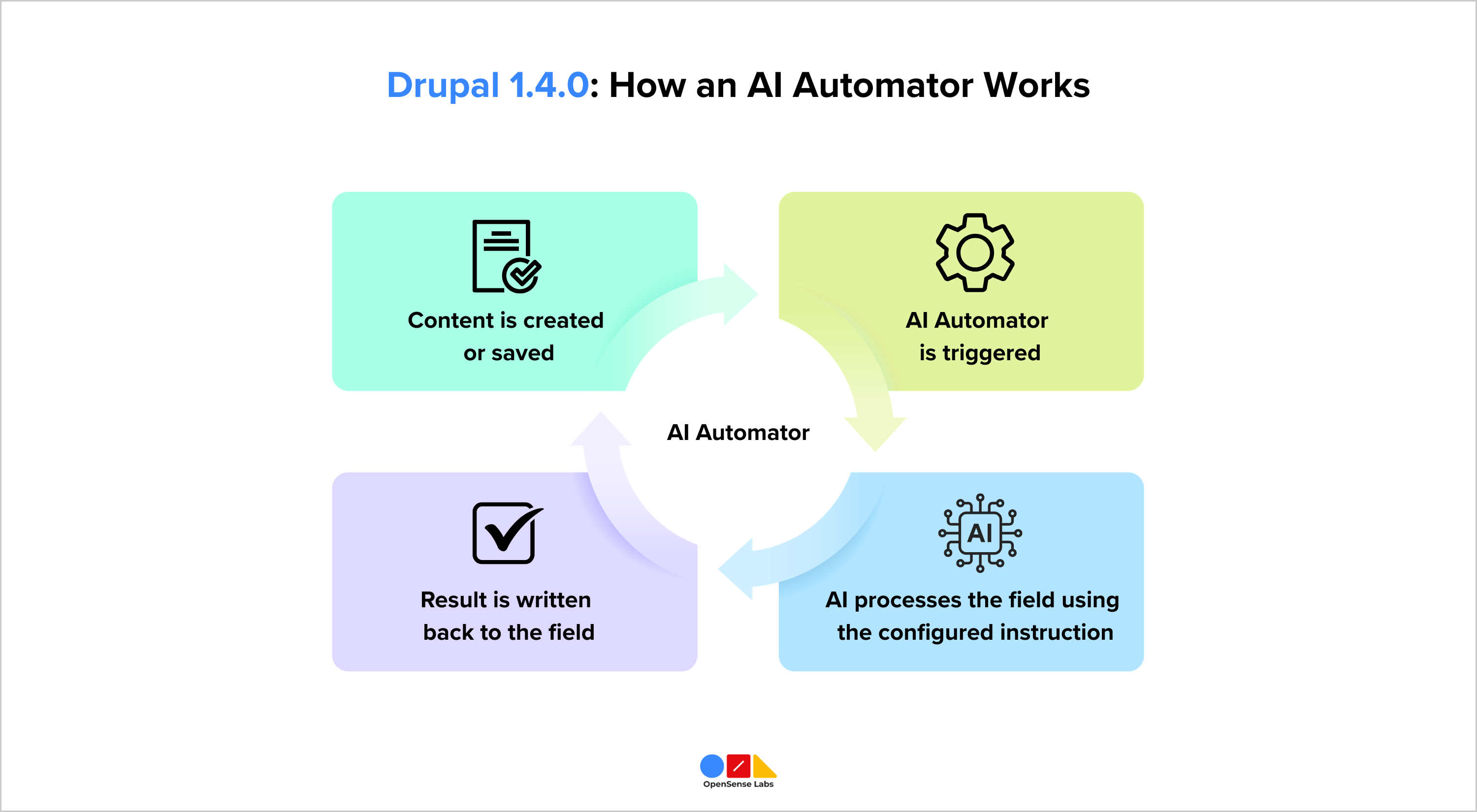
AI Automators is a part of Drupal AI that connects a Drupal field to an AI action. Before this release, an Automator only ran when a single item was created or saved.
Drupal AI 1.4.0 adds support for running Automators as a bulk action, using a feature called Views Bulk Operations.
A site administrator can now select a large group of content, such as every image on the site, and run an AI action across all of them in one process. Any existing Automator rule can be used this way, not only specific pre-set ones.
This is useful for tasks like writing alt text for images uploaded before an accessibility policy was in place. The job runs in the background, so the site keeps working normally while it processes. Running actions in bulk also reduces cost, since it avoids sending one request at a time with repeated delay and overhead.
What Happens When an AI Request Fails?
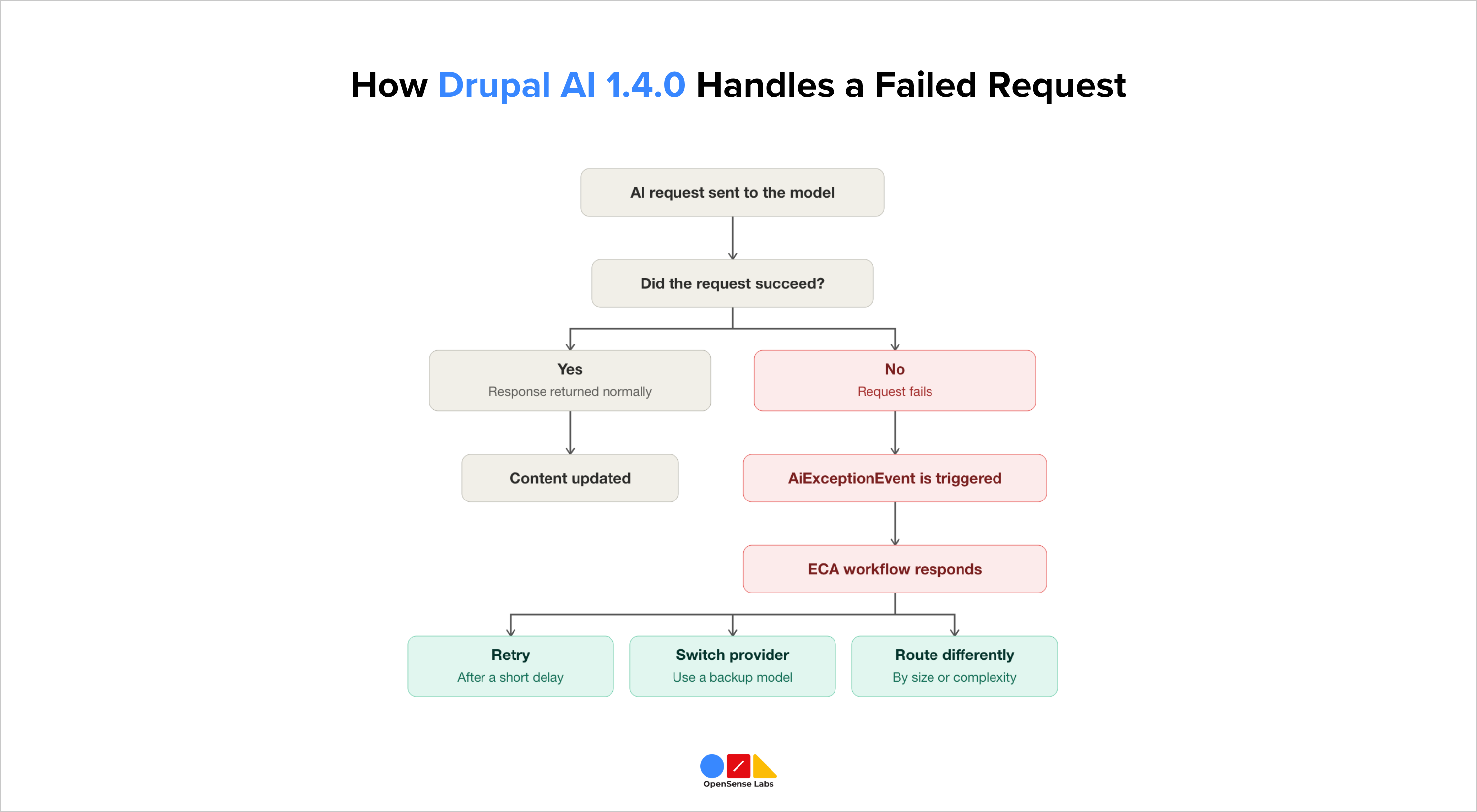
AI requests can fail. A provider's service can be slow, unavailable, or unable to process a request. On a live site, a failure like this should not stop the process or show an error to the editor.
Drupal AI 1.4.0 adds a new event called AiExceptionEvent, which is triggered whenever an AI request fails. This event can be connected to an ECA workflow, which is Drupal's rules engine for automated actions.
Once connected, a site can respond to a failure automatically. If the main AI model does not respond, the workflow can send the request to a backup model instead. It can also retry the request after a short delay, switch to a different provider, or route requests differently based on their size.
The Drupal AI team describes this as an early step toward more advanced failover and routing in future releases.
New Tools for Developers
Alongside the features that editors and site administrators will notice, Drupal AI 1.4.0 also adds tools aimed at the developers who build and maintain AI integrations.
New Drush commands generate starting code for providers, Automators, and guardrails, which reduces the amount of manual setup needed when building a new integration. The release also adds tooling designed for AI-assisted coding tools, such as Claude Code and Codex, which helps a developer generate common AI module components and follow patterns the Drupal AI project already recommends.
Connecting Chat Tools Like Slack
Certain organizations prefer to access Drupal AI via a chat tool that their team is already using, instead of just through the Drupal admin interface. This section covers the new system that makes that possible.
Drupal AI 1.4.0 introduces a standard way for chat tools to connect to Drupal AI, called ChatProcessorInterface. This means different chat interfaces can talk to the same underlying AI processing in Drupal, instead of each one needing its own separate connection.
The release demonstrates this using a Slack-based chatbot connected to Drupal workflows. A team member can send a message in Slack and have it processed by Drupal AI. The Drupal AI team describes this as early groundwork for a future AI Agents processor, not only a Slack-specific feature.
Smaller Additions in Drupal AI 1.4.0 Release
A few other changes are included in Drupal AI 1.4.0 that are worth knowing about, even though they affect fewer teams directly:
- PDF Support: AI models can now read a PDF file directly and answer questions about it through a new capability called ChatWithPdf.
- Multimodal Embeddings: The Embeddings API Explorer now supports more than text, so images and other formats can be used as well.
- Per-Content-Type Suggestion Settings: AI content suggestion settings, such as tone or summary style, can now be set differently for each content type, instead of one setting applying to the whole site.
What This Means for Enterprise Teams
None of these changes requires a new platform. Every capability in Drupal AI 1.4.0 is added to the same Drupal AI module a team may already be using. A site can adopt the useful parts, such as guardrails or bulk automation, without changing anything else about how the site works.
For a team already running Drupal, this release lowers the amount of custom code needed to run AI safely and at scale, and gives a clearer sense of what a site can rely on Drupal AI to handle on its own.
Drupal AI 1.4.0 gives Drupal sites built-in guardrails at the platform level. Enterprises running AI across multiple models and channels often need a governance layer that works the same way everywhere, not just within Drupal.
OpenSense Labs' AI Governance solution scores, filters, and corrects AI outputs in real time, across OpenAI, Claude, Gemini, and other providers, including sites built on Drupal, fitting alongside what Drupal AI 1.4.0 already does.

Join Our Newsletter
Love open-source tech? Stay updated with projects that make a difference.