
The Website Audit Checklist Large Organizations Actually Need in 2026
A generic website checklist and a real website audit checklist are not the same thing. Most checklists in this space are written for someone launching a small-business site: install an SSL certificate, compress a few images, add a privacy policy, and submit a sitemap. Useful advice, but built for a single owner making a handful of decisions before going live.
An enterprise platform doesn't get to close items that way. A retail platform, a healthcare provider portal, or a financial services site serves dozens of page templates, each with distinct performance characteristics, data flows, and accessibility requirements.
A product listing template and a checkout template can pass or fail Core Web Vitals independently of each other. A marketing landing page and a patient portal can have entirely different compliance obligations on the same domain.
Auditing the homepage and calling the site "checked" tells you almost nothing about how the platform performs where it actually matters.
The ownership structure compounds this. On a small site, one person or one agency is usually accountable for the whole checklist. On an enterprise platform, performance typically sits with engineering, accessibility and compliance often sit with legal or a dedicated governance function, and security sits with IT or a CISO's office.
Each function audits against its own scorecard, on its own cycle, using its own tools. Nothing in that structure catches a change that helps one function while quietly working against another, and that is precisely where the more specific checks in this article earn their place.
That's the standard this checklist is built to: not "does the box get ticked," but "does it hold at the template level, across teams, on a schedule your business can actually sustain."
The Core Web Vitals Thresholds Your Audit Has To Hit
A performance audit that doesn't cite numbers isn't really an audit. Google measures three Core Web Vitals, each with a published threshold:
| Metric | Measures | Good | Needs improvement | Poor |
|---|---|---|---|---|
| LCP (Largest Contentful Paint) | Loading speed of main content | ≤2.5s | ≤4.0s | >4.0s |
| INP (Interaction to Next Paint) | Responsiveness to clicks/taps/keypresses | ≤200ms | ≤500ms | >500ms |
| CLS (Cumulative Layout Shift) | Visual stability as the page loads | ≤0.1 | ≤0.25 | >0.25 |
Each metric fails for a different, identifiable reason, and a proper audit check for the cause:
- Largest Contentful Paint: Usually fails because of slow server response time (high TTFB), render-blocking CSS or JavaScript sitting between the browser and the largest element, or an unoptimized hero image or video with no preload hint. The fix is rarely "make everything faster" in the abstract; it's compressing the LCP element to WebP or AVIF, adding a <link rel="preload"> for it specifically, and moving non-critical CSS/JS out of the render path.
- Interaction to Next Paint: Fails when long JavaScript tasks block the main thread, so a click or tap sits in a queue behind other work before the browser can respond. Heavy event handlers and unnecessary third-party scripts (chat widgets, tag managers, personalization scripts) are the most common causes on enterprise sites specifically, because they accumulate one integration at a time and nobody audits the cumulative cost. The fix is breaking up long tasks, deferring non-critical scripts, and auditing what third-party JavaScript is actually still needed.
- Cumulative Layout Shift: Fails when content shifts after it's already rendered, an image or ad slot with no reserved dimensions, a web font swap that resizes text after the page paints, or content injected above what's already on screen. The fix is setting explicit width and height on every image and embed, and using font-display: swap deliberately rather than letting fonts reflow the layout by default.
A second distinction matters for enterprise audits specifically, Google scores Core Web Vitals from two different data sources:
- Field Data: From the Chrome User Experience Report (CrUX), which reflects real visitors on real networks and devices.
- Lab Data: From tools like Lighthouse, which runs a single simulated test. Lab data is useful for debugging a specific page in isolation; field data is what actually determines search ranking and reflects what your visitors experience.
An audit that only reports Lighthouse scores from a developer's machine on office wifi is not measuring the same thing Google uses to judge the site.
The other place enterprise audits diverge from small-site checklists, Google groups similar page templates together when assigning a CrUX score, so one badly performing template a product listing page, a checkout flow can suppress the field data score for every page that shares its template, even pages that individually look fine.
A homepage passing all three metrics tells you nothing about the templates carrying the platform's actual conversion weight. The audit needs to run per template, not per page someone happened to check.
The Security and Accessibility Checks
WCAG 2.2, published in October 2023, added nine new success criteria on top of 2.1. The ones that come up most often in enterprise audits:
| Success criterion | What it requires |
|---|---|
| 2.4.11 Focus Not Obscured (Minimum) | A focused element can't be entirely hidden by sticky headers, cookie banners, or chat widgets |
| 2.5.8 Target Size (Minimum) | Interactive targets are at least 24×24 CSS pixels, or have adequate spacing |
| 3.3.7 Redundant Entry | Information already supplied in a process isn't asked for again, unless re-entry is essential |
| 3.3.8 Accessible Authentication (Minimum) | Login can't rely solely on a cognitive test (e.g., memorizing a password) without an alternative |
Security audits, separately, check for a defined set of response headers: Content-Security-Policy (CSP), Strict-Transport-Security (HSTS), X-Content-Type-Options, X-Frame-Options or frame-ancestors, Referrer-Policy, and Permissions-Policy. Each closes a specific attack surface, CSP restricts which scripts and styles the browser will execute; HSTS forces HTTPS on every request, and so on.
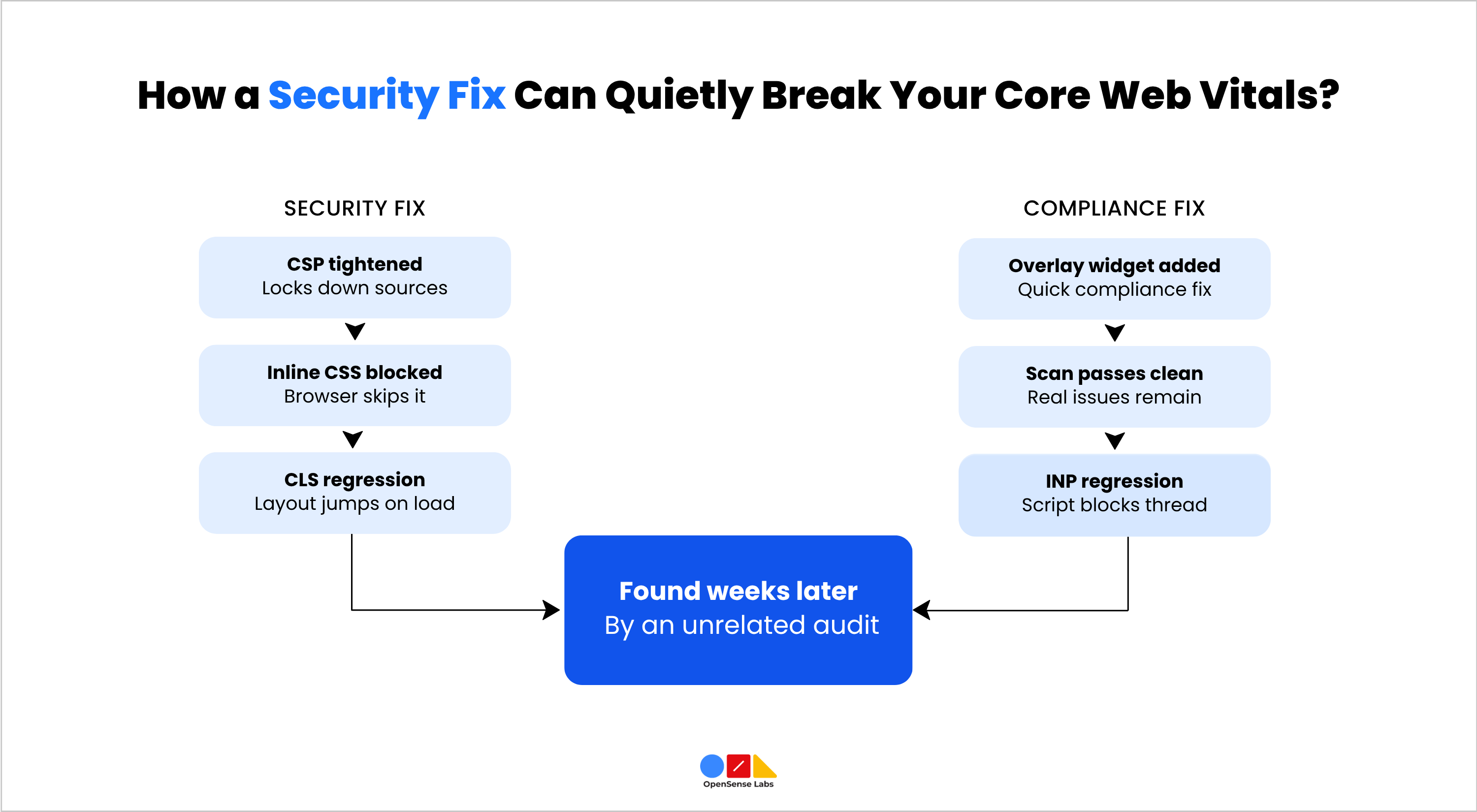
Run in isolation, both checks can pass cleanly and still leave the platform worse off than before either team touched it. Two concrete ways this happens:
- A Tightened CSP Breaks a Performance Fix That Predates It: A common LCP optimizations inlining critical above-the-fold CSS directly in the <head> so the browser can paint before fetching an external stylesheet. A CSP rolled out afterwards to lock down script and style sources will block that inline CSS unless it's explicitly allowed via a nonce or hash. The result is a flash of unstyled content and a CLS regression, not because the CSP is wrong, but because nobody checked what it would break on the way in.
- Accessibility Overlay Widgets Pass a Legal Check While Regressing Performance: Overlay widgets, third-party scripts that claim to remediate accessibility issues without changing the underlying HTML, are a common quick fix when a compliance deadline is close.
The Overlay Fact Sheet, signed by accessibility professionals and organizations including WebAIM, documents that these widgets typically fail to achieve genuine WCAG conformance and can actively interfere with assistive technology.
They also inject a sizeable JavaScript bundle at runtime that reflows the DOM after initial paint, directly regressing INP and CLS. A team under compliance pressure installs the widget, the accessibility scan comes back clean, and the performance regression surfaces weeks later on a completely separate audit cycle, by which point nobody connects it back to the widget.
Neither failure shows if performance, security, and accessibility are checked by three different tools on three different schedules. It only shows up if the same audit pass checks all three against each other, which is the actual argument for a single audit engine over three siloed checklists, not just a preference.
Where GDPR and CCPA Obligations Intersect the Technical Audit
Compliance and technical performance are usually treated as separate checklists, run by separate teams. That separation misses a real overlap: the way a platform is built technically determines whether its compliance obligations can actually be met.
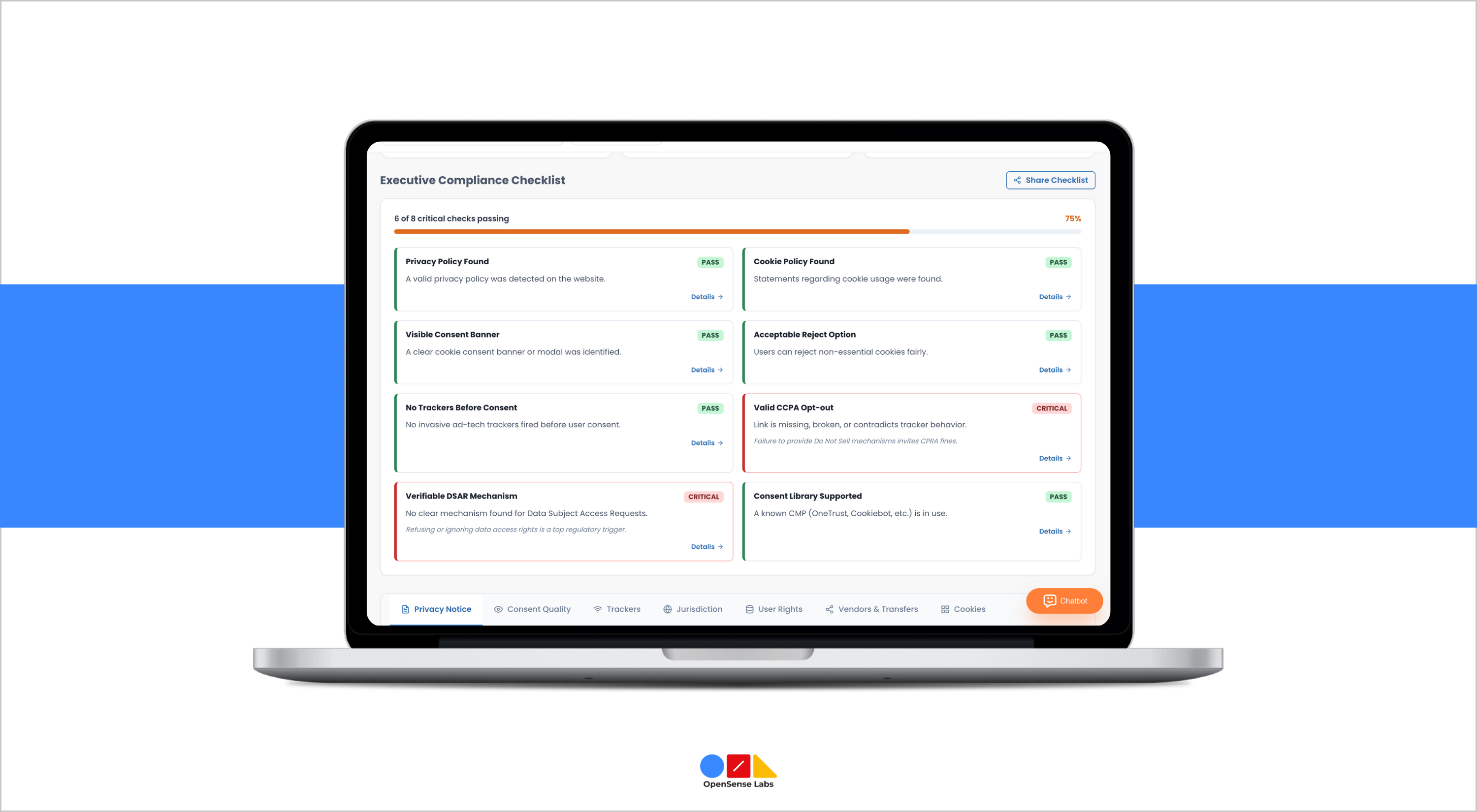
A cookie consent banner is a compliance requirement, but it is also a technical component that loads on every page, and how it is built affects both performance and accessibility scores. A consent management platform that blocks all scripts until a user responds can materially delay LCP if it sits in the render path ahead of the content the user came for. A banner with poor colour contrast or a focus trap that can't be dismissed by keyboard fails WCAG 2.2's focus and target-size criteria at the same time as it fails on consent design.
Data subject requests are also a technical audit item, not only a legal process. Answering a request to access or erase personal data depends on knowing where that data actually lives in web forms, user accounts, analytics tools, logs, and third-party integrations. That is a data-mapping exercise a technical audit is well placed to support, because it requires the same inventory of systems and integrations a platform audit already builds.
This article treats GDPR and CCPA as an intersection with the technical audit rather than a subject in its own right, because the regulatory detail the six lawful bases for processing, the eight data subject rights, breach notification timelines, and how the EU's Digital Omnibus and AI Act are changing some of these requirements deserves its own dedicated treatment. Our platform performance's GDPR compliance checklist covers that ground in full.
The Core Integrity Checks Most Audits Skip Entirely
Performance, security, and accessibility audits all check outcomes: how fast a page loads, whether a header is present, whether a colour contrast ratio passes. Fewer audits check the code producing those outcomes, which is where technical debt accumulates quietly for years.
On a Drupal platform specifically, this shows up as deprecated hooks and API calls that still function on the current core version but are scheduled for removal, custom modules built against APIs that have since changed, and contributed modules that have gone unmaintained while the platform around them has been upgraded twice.
None of this causes an immediate failure. It causes a compounding one, every subsequent performance fix, security patch, or accessibility change has to be built around code nobody fully understands anymore, which is slower and riskier than it needs to be.
A core integrity check should cover, at minimum, deprecated hook and API usage against the current core version, custom module code that hasn't been reviewed since its last core upgrade, contributed modules with no maintainer activity in the past 12 months, and database query patterns that scale poorly as content volume grows rather than only at current volume. This is the layer that determines how expensive every other fix on this checklist turns out to be.
Why a Quarterly Website Audit Checklist Beats an Annual One
The frequency a website audit checklist runs on matters as much as its content, because technical debt, security exposure, and content volume all compound between audit cycles, not just during them.
| Cadence | What to Check | Why this Frequency |
|---|---|---|
| Weekly | Core Web Vitals field data, uptime, crawl errors | Catches regressions from routine deploys before they compound |
| Monthly | Security header configuration, dependency and module updates, accessibility spot-checks on new content | Matches the pace most CMS platforms release patches and content teams publish |
| Quarterly | Full WCAG 2.2 audit, penetration testing, core integrity review, data-mapping refresh | Deep checks that need dedicated time and tooling, run often enough that debt doesn't silently accumulate between cycles |
An annual website audit checklist treats the platform as a fixed point that gets reviewed once and left alone for 12 months. In practice, a platform that size is never static, new integrations get added, content teams publish continuously, dependencies release patches on their own schedule, and each of those changes can quietly reopen an issue the last audit closed. A quarterly deep website audit checklist, backed by lighter weekly and monthly checks, catches drift while it is still a small fix rather than a rebuild.
Turning a Website Audit Checklist into Continuous Audit Infrastructure
Every check in this article can be run as a one-off. A static PDF listing this quarter's Core Web Vitals scores, WCAG failures, and security gaps is still, technically, an audit. What it cannot do is catch the interactions described earlier in this article, the Content-Security-Policy that breaks a CSS optimisation shipped six months prior, the overlay widget that passes an accessibility scan while regressing INP, because those only surface when the same system checks all three layers against each other, continuously, rather than as three separate reports produced on three separate schedules.
The alternative is treating the website audit checklist as infrastructure rather than an event, one engine running the performance, security, accessibility, and core integrity checks in this article continuously, with findings routed directly into the team's existing workflow rather than left in a document that ages the moment it's published. That shift from a periodic report to a standing system is what actually keeps a platform in the state this checklist describes, rather than back at the start of the website audit checklist every 12 months.
If your team is running these checks across three or four separate tools and schedules, OpenSense Labs' Platform Performance solution consolidates them into a single audit and resolution engine, syncing findings directly into your existing DevOps environment rather than leaving them in a static report.

Join Our Newsletter
Love open-source tech? Stay updated with projects that make a difference.