
LMS Integration: Learner Paid but Has No Access
A learner pays, receives the confirmation email, and then finds the course locked. The payment worked, so the fault sits in the LMS integration, in a handoff between payment, access, CRM, and helpdesk that no single system owns. Each locked course costs a support ticket, staff time, and sometimes the sale.
A learning company usually runs a payment provider, an LMS, a CRM, and a helpdesk, and each system holds a different part of the same purchase. When those systems disagree, someone resolves the difference by hand, and that work grows with every new product, currency, and corporate buyer.
This article follows one purchase through those systems, covers where access fails and what manual reconciliation costs, and sets out how to choose between a native connector, middleware, and a custom build.
What Revenue Leakage from Weak LMS Integration Looks Like
In this context, revenue leakage describes revenue that the company collects but cannot fully deliver because the product the learner paid for does not reach the learner on time. Several costs follow from that gap:
- Refunds: A learner who waits for access often asks for a refund. The company loses the sale and, depending on the provider’s terms, may not recover the processing fee.
- Chargebacks: A learner who cannot reach support quickly may dispute the charge with the card issuer, which adds dispute fees and administrative work.
- Unmatched Payments: Finance teams compare payouts against enrolments, and every payment without a matching enrolment needs investigation.
- Engineering and Administrator Time: Staff grant access manually, merge duplicate accounts, and rerun failed jobs.
- Lapsed or Retained Access on Subscriptions: A renewal that succeeds while access ends, or a cancellation that leaves access open, creates either a support ticket or unpaid usage.
Each of these costs is small for a single learner. The total grows with the number of purchases, and a weak LMS integration makes it grow faster as the company adds products, currencies, cohorts, and corporate buyers.
The Five LMS Integration Handoffs Between Payment and Access
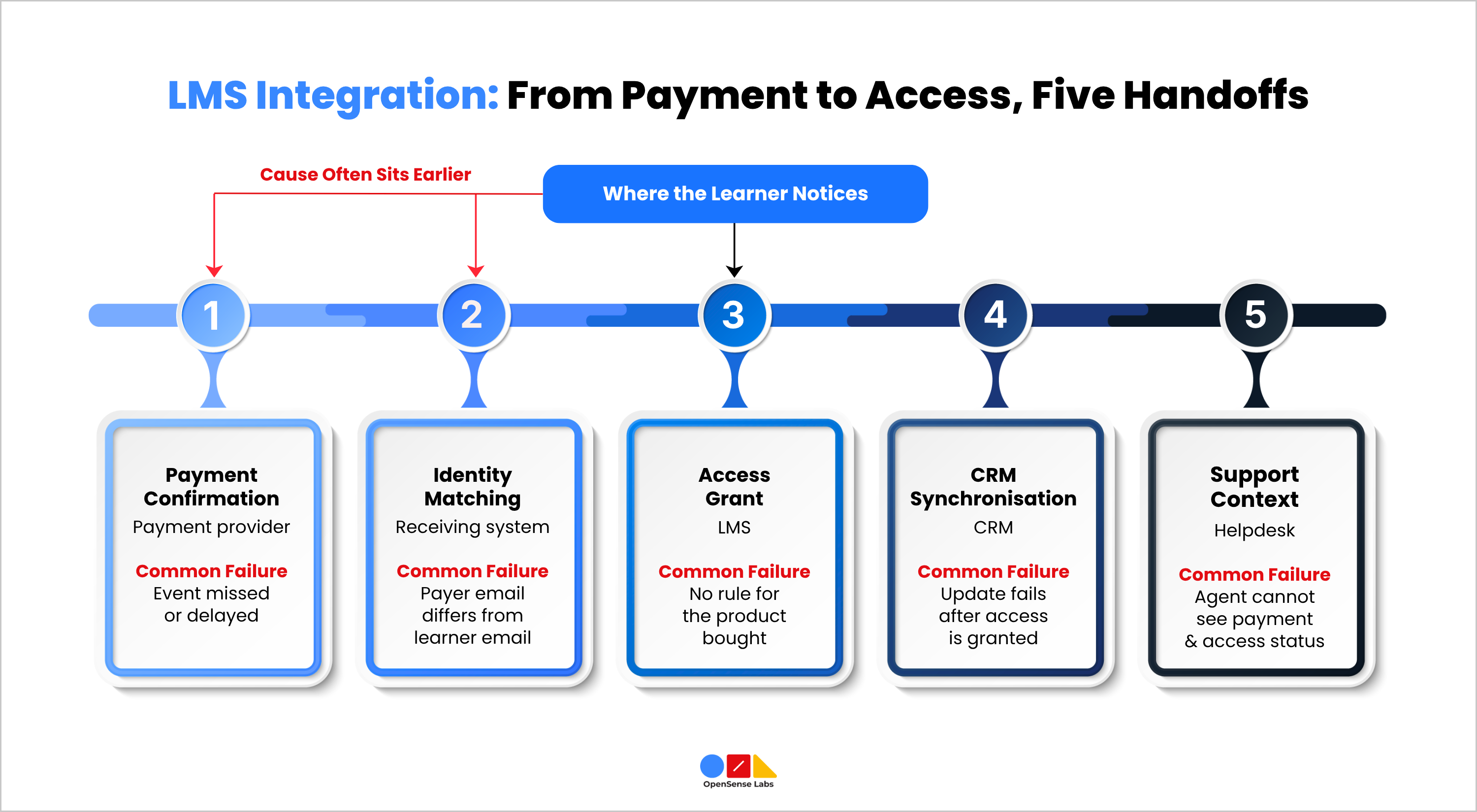
An LMS integration moves a purchase through five handoffs before the learner, the sales team and the support team see the same information. Mapping these handoffs shows a founder or CTO where a fault sits.
- Payment Confirmation: The payment provider confirms the transaction and sends an event, usually through a webhook, to the LMS or to an intermediate service. The event should carry the amount, currency, transaction identifier, product reference, and customer identifier.
- Identity Matching: The receiving system decides whether the payer is an existing learner or a new one. Email address is the most common match key, although the payer’s email often differs from the learner’s email when an employer, parent, or sponsor pays.
- Access Grant: The LMS maps the purchased product to an entitlement, such as a single course, a bundle, a cohort seat, or a subscription term, and then creates the enrolment. The mapping needs a rule for every product the company sells.
- CRM Synchronisation: The CRM records the purchase against the correct contact and account, so sales and customer success teams see the same status as the LMS. This step also supports renewal outreach and corporate account reporting.
- Support Context: The helpdesk shows the agent the learner’s payment status, access status, and enrolment history. An agent who sees all three can resolve most access tickets without opening other systems, and the same context needs to travel with a conversation that moves from a chatbot to a person, as covered in the guide to chatbot human handoff.
Each handoff has an input, an output, and an owner. A failure at an early handoff passes incorrect data to every later handoff, so the symptom that the learner reports, a locked course, usually appears some distance from the cause.
Where Each LMS Integration Handoff Fails
Most access failures come from a small set of causes. Knowing these causes lets a team design checks at the right points.
- Missed or Delayed Events: The receiving endpoint may be unavailable during a deployment or an outage. Payment providers retry failed webhook deliveries for a limited period and then stop, so an event that never arrives stays missing unless the company compares its own records against the provider’s records.
- Duplicate Events: Providers can deliver the same event more than once. Without a check that recognises a repeated transaction identifier, a duplicate event creates duplicate enrolments, duplicate CRM deals or repeated welcome emails.
- Identity Mismatch: A learner who pays with one email address and holds an LMS account under another address ends up with a second account, a split learning record and a payment that no enrolment references. Name changes, shared inboxes and corporate aliases produce the same result.
- Entitlement Mapping Gaps: A price change, a new bundle or a renamed product in the payment provider can leave no matching rule in the LMS. The payment succeeds, the event arrives, and no enrolment rule fires.
- Subscription State Drift: Renewals involve failed charges, automatic retries, grace periods, and cancellations. The LMS and the payment provider can hold different views of the subscription for days, which leads to access that continues without payment or ends despite payment.
- Refunds and Disputes: A reversed payment needs a decision about access. The company may revoke access immediately, revoke it at the end of the paid period, or keep access to completed content, and the integration needs to apply that decision for full refunds, partial refunds, and chargebacks.
- Partial Failure Across Systems: The LMS may grant access while the CRM update fails. The learner has no problem, but the sales team sees no purchase and the support agent sees no record, which creates a ticket later.
These LMS integration failures share one cause, because each system reports success for its own step and nothing checks the full sequence from payment to support context.
Manual Reconciliation and the Support Cost
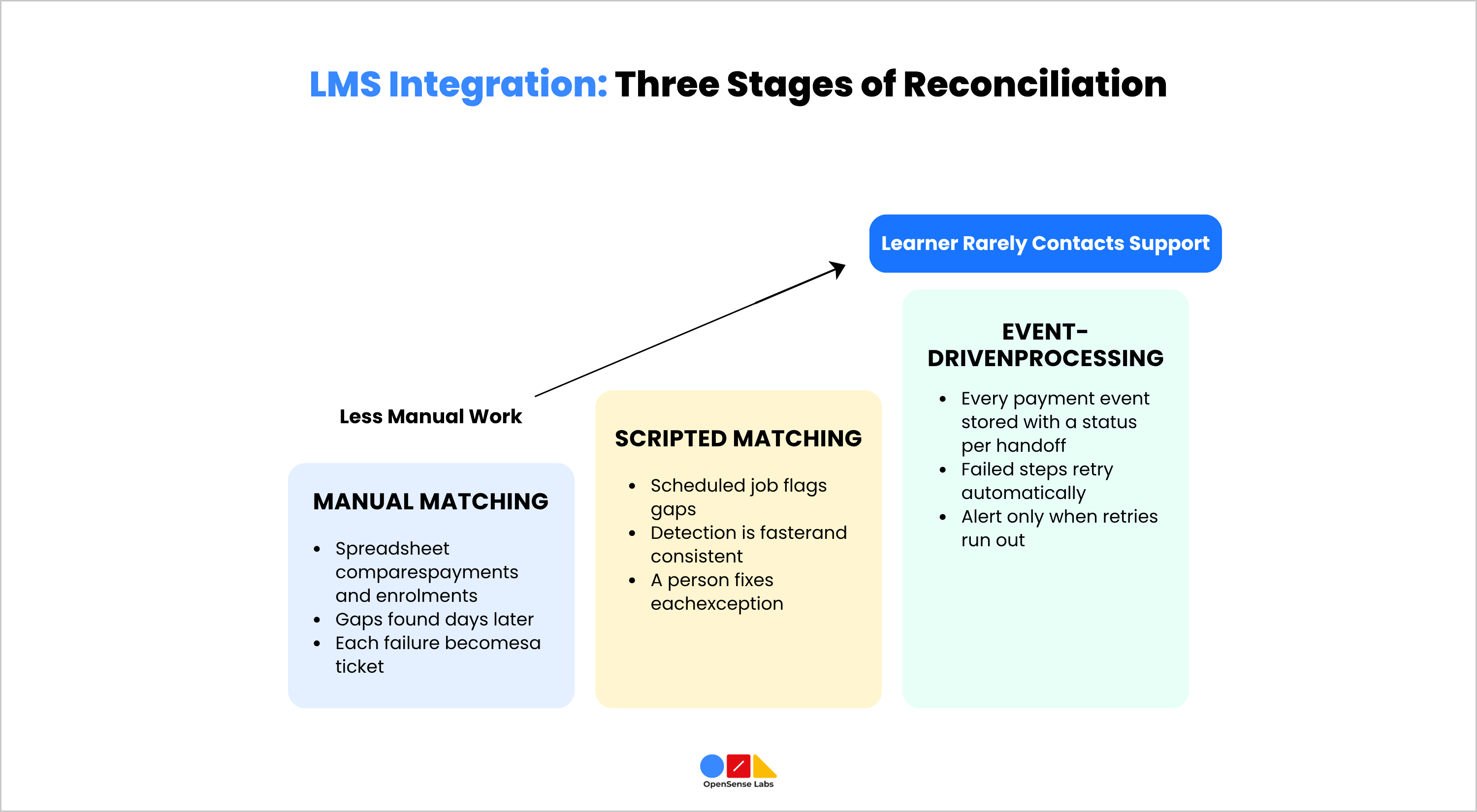
Reconciliation is the process of confirming that every payment has a matching enrolment, CRM record, and support view. Learning companies usually move through three stages as volume grows.
- Stage One, Manual Matching: Finance exports payments from the provider, an administrator exports enrolments from the LMS, and someone compares the two lists in a spreadsheet. The process finds gaps days after they occur. Learners wait for access in the meantime, and the work depends on one person’s availability.
- Stage Two, Scripted Matching: A scheduled job compares provider records with LMS enrolments and flags gaps. The detection is faster and more consistent, but a person still has to fix each exception and has to check the CRM and helpdesk separately.
- Stage Three, Event-Driven Processing with a Ledger: A mature LMS integration stores every payment event with a status for each handoff. A failed step retries automatically; an exception that exhausts its retries raises an alert with the transaction and learner details, and the helpdesk displays the current status to the agent.
The support cost follows the same pattern. Access tickets are repetitive and need data from several systems, so they take more agent time than a typical ticket and tend to escalate to engineering. A company at stage one handles each failure with a ticket, a delay, and manual work. A company at stage three handles the same failure with an alert that an engineer reviews. In most cases, the learner never contacts support.
Which System Owns Which Record
Disagreements between systems cause many reconciliation problems in an LMS integration, and a clear ownership rule removes most of them. Each category of record has one system that holds the authoritative version.
- Payment Provider: Owns the money state, including amount, currency, payment status, refunds and disputes.
- LMS: Owns the access state, including enrolments, progress, completion and certificates.
- CRM: Owns the commercial relationship, including contact, organisation, deal and lifecycle stage.
- Helpdesk: Owns the case state, including tickets, history and resolution.
A company that runs a learning experience platform next to its LMS adds a fifth system with its own access records, and the choice between the two platform types is covered in LMS vs LXP for higher education.
When two systems disagree, the owner of that record type decides the outcome. If the payment provider shows a refund and the LMS shows active access, the LMS updates its record according to the business rule for refunds. The business should write that rule in advance, with input from finance and support as well as engineering, because the rule affects revenue, learner experience, and dispute handling.
Card data needs separate treatment. The payment provider should hold payment credentials, and the LMS should store only the transaction status and identifiers it needs to grant access. This approach limits the LMS’s compliance responsibility and keeps the integration simpler to audit.
Native Connector, Middleware or Custom Build for LMS Integration
The right LMS integration approach depends on the complexity of the company’s offer and the capacity of its team. Five factors decide most cases:
- Volume and Event Types: The integration needs to handle purchases, renewals, failed charges, refunds, and disputes, and the volume of each affects retry design and monitoring.
- Entitlement Complexity: One product that maps to one course is simple, while bundles, cohort seats, corporate licences, and multi-currency pricing need more rules.
- Number of Systems: Connecting a payment provider and an LMS is a smaller task than connecting those two plus a CRM, a helpdesk, and a finance tool.
- Team Capacity: Someone has to monitor the integration, respond to alerts, and update it when a provider changes its API.
Compliance and audit needs. Some buyers need a full record of every access decision, which a basic connector may not provide.
A native connector suits a company with one payment provider, a simple product structure, and modest volume. The team should confirm which events the connector handles, whether it covers refunds and failed renewals, and whether it logs failures where an administrator can see them.
Middleware suits a company that connects several systems with moderate rules. It routes and transforms events between tools without custom code, but it adds another system to monitor, and its per-task pricing can rise at higher volumes.
A custom build suits a company with bundles, cohorts, business-to-business seats, multiple currencies, or strict reconciliation requirements. The company controls retry behaviour, duplicate detection and logging, and in return it takes on the cost of maintenance. Companies that choose this route usually plan custom LMS development with an internal engineering team or an external build partner and design event handling before writing the connectors.
Many companies end up with a hybrid, using a native connector for payments and custom logic for entitlements and reconciliation. Open-source platforms are a common base for the hybrid route, and an earlier OpenSense Labs guide to building LMS and e-learning systems with Drupal explains why some learning organisations choose them over a SaaS LMS. Whichever approach a company chooses, the first question for a vendor or partner should be about failure handling. Ask what happens when an event is missed, duplicated, or rejected before discussing features and cost.
To Wrap This Up
A learner who pays and cannot access a course exposes a gap in LMS integration across the company’s systems. The gap spans five handoffs, from payment confirmation to support context, and widens as products, buyers, and currencies multiply. Founders and CTOs can close it in three steps.
They map the handoffs, assign each record type to one owning system, and choose an approach that fits their complexity and team capacity. The result is automatic detection and recovery in place of manual reconciliation.
OpenSense Labs works with founders and CTOs of learning companies to design and build learning platforms and the integrations around them, and its STEM Fuse case study shows how one platform runs under a support and maintenance agreement after launch. The Learning Experience Platform solution starts from an existing platform core, so custom work concentrates on the integrations and access rules that are specific to each business.

Join Our Newsletter
Love open-source tech? Stay updated with projects that make a difference.