
Chatbot Human Handoff: Escalation Triggers, Context Transfer and Queue Design
A chatbot human handoff is easiest to fix before launch and hardest to fix once customers are waiting. This article gives teams a set of trigger groups, payload fields, queue rules, and a build order to test against real conversations first.
A chatbot human handoff succeeds or fails on three design decisions that teams often settle late and separately. The bot has to decide when to escalate, what information moves with the conversation, and which queue receives it.
A customer who disputes a charge, asks to cancel, or asks for an agent a second time meets all three decisions in a single exchange.
This article sets out each decision for engineering leads and support operations teams, together with the failures that follow when each one is specified poorly.
What a Chatbot Human Handoff Involves?
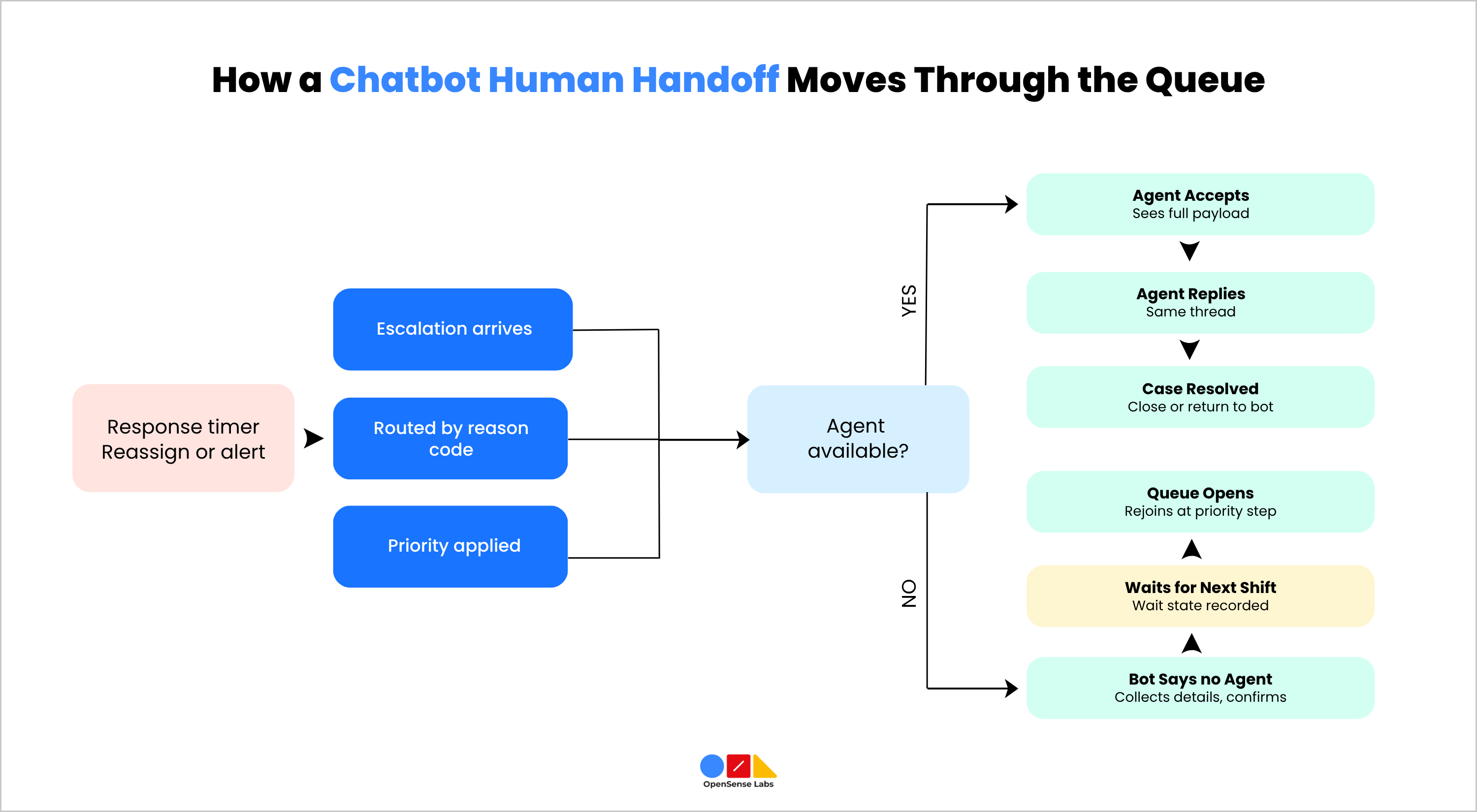
A chatbot human handoff is the point at which an automated conversation transfers to a human agent, who then continues it. The transfer runs as a series of system events. The bot detects a condition that needs a person and packages what it knows about the conversation. It then places that package in a queue where an agent can accept it. The agent then replies in the same thread, and once the issue is resolved, the conversation either closes or returns to the bot.
Three design decisions sit inside that sequence, and each one can fail independently of the others:
- Trigger: The conditions under which the bot stops answering and requests a person.
- Context: The data that moves with the conversation, including the transcript, customer identity, structured details the bot collected, and anything the bot told the customer.
- Queue: The set of rules that determine which agent handles a conversation, how many people can wait, and how fast someone gets a response.
A correct trigger paired with an empty payload produces an agent who asks the customer to repeat everything. A complete payload sent to a queue that nobody monitors produces a customer who waits without a reply. Teams therefore specify and test the three decisions together, and the sections below cover each in turn.
Two distinctions help when scoping a chatbot human handoff. A fallback message that apologises and ends the conversation does not count as a handoff, because it never reaches a person. A cold transfer passes the conversation to an agent without context and without confirmation that anyone is available, while a warm transfer passes the context and confirms that an agent has accepted the conversation before the customer is told a person has joined.
What are the Escalation Triggers?
In a chatbot human handoff, escalation triggers are the rules that tell the bot to stop answering and request a person. Teams get more reliable behaviour by grouping triggers according to where each signal originates, because every group needs a different data source, a different starting default, and a different tuning process. Four groups cover most deployments.
- Explicit Customer Request: A customer makes a direct request for a person by either typing their request or clicking a handoff button. The bot should detect this through an intent classifier and escalate immediately, without trying to answer once more. If there are no agents ready to help, the bot should let the user know and suggest another option like scheduling a callback.
- Bot-Side Signals: These come from the bot’s own processing, such as low retrieval confidence, consecutive fallback responses, or a failed tool call. A common starting point is to escalate after two consecutive fallbacks, with thresholds calibrated against the team’s own labelled transcripts. A threshold that is too high raises the human workload, while one that is too low lets the bot answer from weak retrieval.
- Conversation Signals: These come from how the customer behaves, such as a sentiment shift across several messages or the same question rephrased more than once. Measuring the trend over several turns and requiring a second signal gives better precision than reacting to a single message. A threshold that is too sensitive escalates mild impatience, and one that is too lax misses customers who abandon the chat.
- Business Rules: These are fixed policies that apply regardless of bot confidence, covering categories such as cancellations, billing disputes, legal threats, high-value accounts, and regulated content. Support, legal, and compliance should own the list, and engineering should store it as runtime configuration and not as prompt text. A list that is too broad removes the automation benefit, and one that is too narrow leaves the bot handling risky situations.
How the Groups Combine
Business rules and explicit requests start a chatbot human handoff on their own, while bot-side and conversation signals work better as a combined score. Every escalation should record a reason code naming the group and the rule that fired, which travels with the conversation and feeds the measurement section.
Context Transfer
In a chatbot human handoff, context transfer covers the data that moves with the conversation when the bot passes it to an agent. The agent should be able to act on the conversation without asking the customer to repeat anything, so the payload needs to cover what the customer said, who the customer is, what the bot did, and why the bot escalated.
- Transcript and Summary: The verbatim transcript is the source of truth and should always travel with the conversation. A generated summary works well as a header above the transcript because it lets an agent scan the case in seconds. A summary alone loses the exact wording, the order of questions, and the links the bot sent. Because a model writes the summary, it can also misstate details, so the agent needs the original messages within one click.
2. Handoff Payload Fields
The table below lists the fields a chatbot human handoff payload should carry, with the people and systems that use each one.
| Field | Contents | Main User |
|---|---|---|
| Verbatim Transcript | Full message history with timestamps | Agent |
| Summary | Short recap placed above the transcript | Agent, router |
| Customer Identity | Verified identifier and link to the customer record | Agent, CRM |
| Authentication Status | Whether the bot verified identity and by which method | Agent |
| Structured Details | Order number, account ID, or booking reference the bot collected | Agent |
| Reason Code | Trigger group and rule that fired | Router, analytics |
| Bot Assertions | Policies quoted, articles linked, and commitments made | Agent |
| Actions taken | Tool calls and their results, such as a refund the bot started | Agent |
| Channel and Thread ID | Origin channel and the thread the reply must return to | System |
| Wait State | Time in queue and what the customer was told to expect | Agent, queue |
Bot assertions deserve particular attention because integrations drop them most often. If the bot quoted a refund policy or promised a callback, the agent needs to see that statement, or the business appears to contradict itself within the same conversation. Logging each commitment as a structured entry makes it visible in the agent view and available for later review.
3. Channel and Identity Continuity: The agent’s reply should arrive in the same thread and on the same channel where the conversation started. When you switch a messaging chat to email, the customer sees it as starting a completely new conversation. Identity needs the same care, since an anonymous web visitor has no record to attach to until the bot captures an identifier.
Linking the conversation to a customer record as soon as the identifier appears gives the agent past orders and open tickets. Voice channels need an extra step, because a call produces no transcript until a transcription service creates one, and the transfer has to include that transcript.
Queue Design
Queue design covers the rules that decide which agent receives an escalated conversation in a chatbot human handoff, in what order and within what time. The payload from the previous section gives the router the data it needs, and the queue rules determine how quickly a person responds.
- Routing: Skills-based routing matches each conversation to an agent group using the reason code and the structured details in the payload. Typical routing dimensions include:
- topic, such as billing, technical support or account changes
- language
- customer tier
- region, where agents work in separate time zones or follow different regulations
A single shared queue is simpler to build, but it sends every case to whichever agent is free, including cases that need a specialist. Teams usually start with a small number of queues mapped to the most common reason codes and add more only when the data shows a clear need.
2. Capacity and Priority: Each agent should have a concurrency limit, because a conversation accepted beyond that limit waits without a reply while the customer believes a person has joined. Priority rules then order the queue, with business-rule escalations such as safety concerns or high-value accounts ranked above routine requests. Waiting time can also raise priority, so a conversation that has waited past a set point moves ahead of newer arrivals.
3. Response Timers: Each queue needs a target for time to first human response, and the system needs a defined action when that target passes. The action can be reassigning to a backup group or alerting a supervisor. Timers also protect against a conversation that sits in a queue no agent is watching, which is a common cause of silent escalations.
4. Unavailable Queues and Out-of-Hours Handling: When there are no agents ready to help, the bot should tell the customer this clearly. It should then ask for the information needed to respond to them. Finally, it should let the customer know where they will get the answer and when it will arrive. The conversation then enters a queue that opens at the start of the next shift, and the wait state field in the payload records what the customer was told. A callback or a scheduled reply gives the customer a specific next step, which an open-ended promise of help does not.
5. Return to the Bot: After the agent resolves the issue, the conversation can close or return to the bot for follow-up questions. A return path works well when the agent marks the case as resolved, and the bot receives the outcome, so it does not repeat an answer the agent has already corrected. If the customer writes again after closure, the system should reopen the same thread and keep the earlier handoff context available.
Common Handoff Failures
Most chatbot human handoff failures trace back to one of the three design decisions, which makes them easier to diagnose once the team knows which decision produced them. The table below shows each failure, what caused it, and how to fix it.
| Failure | What the Customer experiences | Design Decision at Fault | Fix |
|---|---|---|---|
| Cold Transfer | The agent opens with a greeting and asks the customer to start again | Context | Send the full payload and show the transcript before the agent accepts |
| Escalation Loop | The bot keeps answering after the customer asks for a person | Trigger | Treat an explicit request as an immediate escalation |
| Silent Queue | The bot says help is coming and no one replies | Queue | Set response timers with reassignment and an out-of-hours path |
| Contradicted Commitment | The agent denies a policy or promise the bot gave | Context | Log bot assertions as structured entries in the payload |
| Wrong Specialist | The conversation passes between agents before anyone resolves it | Queue | Route on reason code and review the mapping against transfer data |
| Over-Escalation | Agents spend time on questions the bot could have answered | Trigger | Recalibrate thresholds against labelled transcripts |
Two of these failures often appear together. A silent queue combined with a cold transfer leaves a customer who has waited and then has to repeat the whole case, so teams get more value from testing the two decisions in the same scenario than from testing each in isolation.
Measuring Handoff Quality
Chatbot human handoff metrics work best when the team tracks them separately for AI-resolved and human-resolved conversations, since a combined figure hides where the handoff is failing. The following measures cover the three design decisions.
- Escalation Rate by Reason Code: This shows which trigger groups fire most often and which rules produce escalations that agents then resolve with a single reply, which usually indicates a threshold that is too low.
- Containment Rate: The share of conversations the bot resolves without a person. It needs to be read alongside satisfaction scores, because a high containment rate with falling satisfaction suggests the bot is holding conversations that should escalate.
- Re-Ask Rate: The share of escalated conversations in which the agent asks for information the customer already gave. This measures context transfer directly and should stay close to zero.
- Time to First Human Response: The interval between the escalation and the agent’s first message, tracked per queue and against the timer targets.
- Transfer Count: The number of times an escalated conversation moves between agents or queues, which indicates routing accuracy.
- Post-Handoff Satisfaction and Reopen Rate: Customer satisfaction on escalated conversations, together with how often a closed case returns, which indicates whether the agent resolved the issue.
Reason codes make these measures usable, because each escalation carries the rule that fired and the team can trace a poor outcome back to a specific trigger, payload field, or queue.
Building and Testing a Chatbot Human Handoff
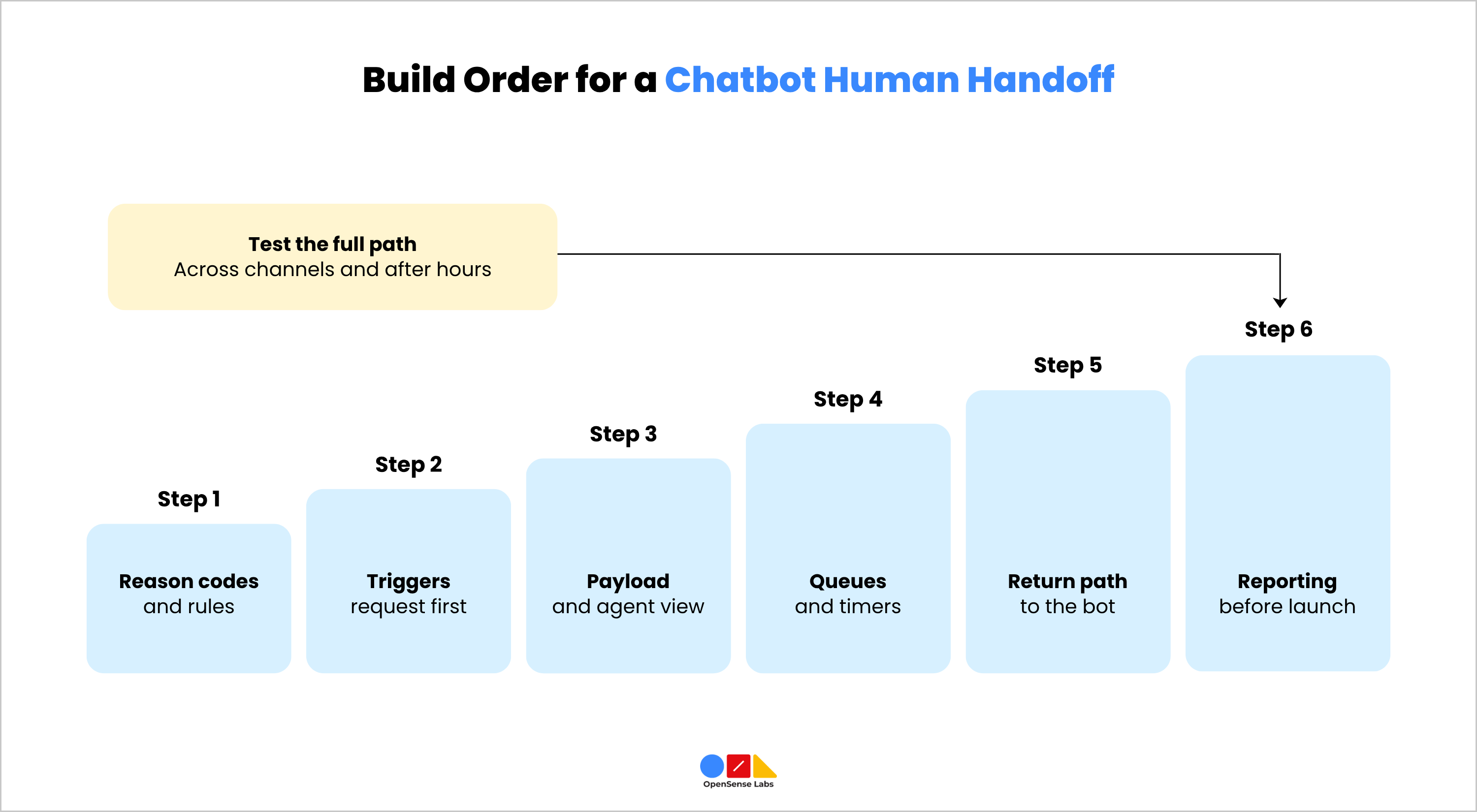
Engineering teams usually get a more reliable result by building the chatbot human handoff in the order of the three decisions and testing the full path before launch. The sequence below suits most deployments.
- Define the reason codes and the business-rule list with support, legal, and compliance owners.
- Implement the explicit request trigger first, then add bot-side and conversation signals with thresholds set from labelled transcripts.
- Specify the payload fields and confirm that the agent interface displays each one, including bot assertions and actions taken.
- Configure the queues, concurrency limits, priority rules and response timers, and define the out-of-hours behaviour.
- Connect the return path so the bot receives the outcome after the agent resolves the case.
- Add reporting for the measures above before launch so the first week of data is usable.
Testing should use real conversations from the support history, including at least one with an angry customer and one where the knowledge base holds no answer. The team runs each conversation through every supported channel, checks what the agent sees at the moment of handoff, replies as the agent, and confirms the customer receives the reply in the original thread.
The same set then runs outside staffed hours, since gaps in queue and timer configuration appear there first. After launch, a weekly review of escalations grouped by reason code gives the team the data to adjust thresholds and routing.
Designing the Three Decisions Together
A chatbot human handoff holds up when the trigger, the context payload, and the queue rules are specified together and tested as one path. Every choice relies on the ones before it. The trigger creates the reason code, the payload moves it along, and the queue reads it to send the conversation the right way and check how things turned out.
Organisations that build conversational AI on their own systems also need to connect the handoff to their existing helpdesk, CRM, and identity data, which is where most of the engineering effort sits. OpenSense Labs creates AI chatbots that handle customer conversations and automatically send complex issues to the right support team. The chatbots remember conversation details and work with your existing support tools. Details of that work are on the AI Chatbot solutions page.

Join Our Newsletter
Love open-source tech? Stay updated with projects that make a difference.