
Workforce Management Tool: Features, Benefits & Complete Guide
“Simply Manage is a workforce management tool designed to streamline workflows across teams, making time tracking, resource planning, and team management more efficient."
A modern workforce management tool plays an important role in bringing visibility, structure, and coordination to how teams plan and execute work.
“When management disappears, so does direction. A leaner organization today can mean a leadership crisis tomorrow.” - Lesley Uren, CEO, Korn Ferry Consulting
In 2025, the Korn Ferry Workforce survey reported that 43% of employees indicated that their leaders are not aligned, while 37% express that the absence of managers has left them feeling directionless.
The impact goes far beyond a streamlined org chart. Removing layers of management can quickly lead to employee confusion, frustration, and lower productivity.
Without clear oversight and coordination, even day-to-day operations become harder to manage. Tracking who’s working on what, keeping projects on budget, billing clients accurately, and ensuring no team member is overstretched by the complexity quickly adds up.
Modern workforce management software brings structure to this complexity. It enables better forecasting, monitoring, and scheduling, confirming that the right people with the right skills are available when and where they’re needed.
What is Workforce Management Tool?
A workforce management (WFM) solution is a software application designed to help organizations optimize how work is planned, tracked, and executed. It focuses on managing employee time, allocating resources effectively, enabling accurate reporting, and improving visibility across teams.
The ultimate objective of these processes is to determine priorities within an organization and anticipate potential challenges. This allows proactive action, improving productivity, while reducing risk.
By integrating workforce management capabilities into advanced software, organizations can be empowered to more effectively connect with their employees, improve customer service, and positively influence their financial outcomes.
Understanding the difference between workforce management vs employee management vs scheduling tools helps organizations choose the right solution. While standalone tools solve specific problems, workforce management platforms offer a more integrated approach.
Top Five Benefits of Workforce Management Tools
A reliable provider of workforce management tools will guarantee a fit between their offerings and the business in need of assistance. The right solution can be beneficial in several ways:
- Automated Attendance Tracking: Simplifies the way employee hours are monitored, cutting down on mistakes and administrative tasks.
- Lower Costs: Adjusts staffing levels and schedules to avoid overstaffing and lower labor expenses.
- Improved Workforce Productivity: Matches employee skills and schedules with business requirements, boosting workforce efficiency.
- Compliance Assurance: Aids in following labor laws and regulations, lowering the chances of facing non-compliance penalties.
- Enhanced Employee Satisfaction: Provides self-service tools and flexible scheduling options, increasing employee engagement and retention.
Overall, a workforce management tool assists organizations in aligning their staff with business objectives while ensuring agility, efficiency, and compliance.
Simply Manage: A Workforce Management Tool at OSL
Simply Manage is a workforce management tool built to unify time tracking, resource planning, and reporting in a single platform.
It brings together smart time tracking, visual resource forecasting, deep integrations (Jira, Keka), automated reporting, timesheet approvals, attendance management, WFO tracking, and a powerful browser extension - all under one roof.
Yet, having all the features in one place is only part of the equation. Every business operates differently, with its own set of challenges and workflows. Simply Manage, OpenSense Labs’ workforce management tool, is built to address these complexities with a unified approach.
While most tools in the market solve only one piece of the puzzle, Simply Manage solves all of them.
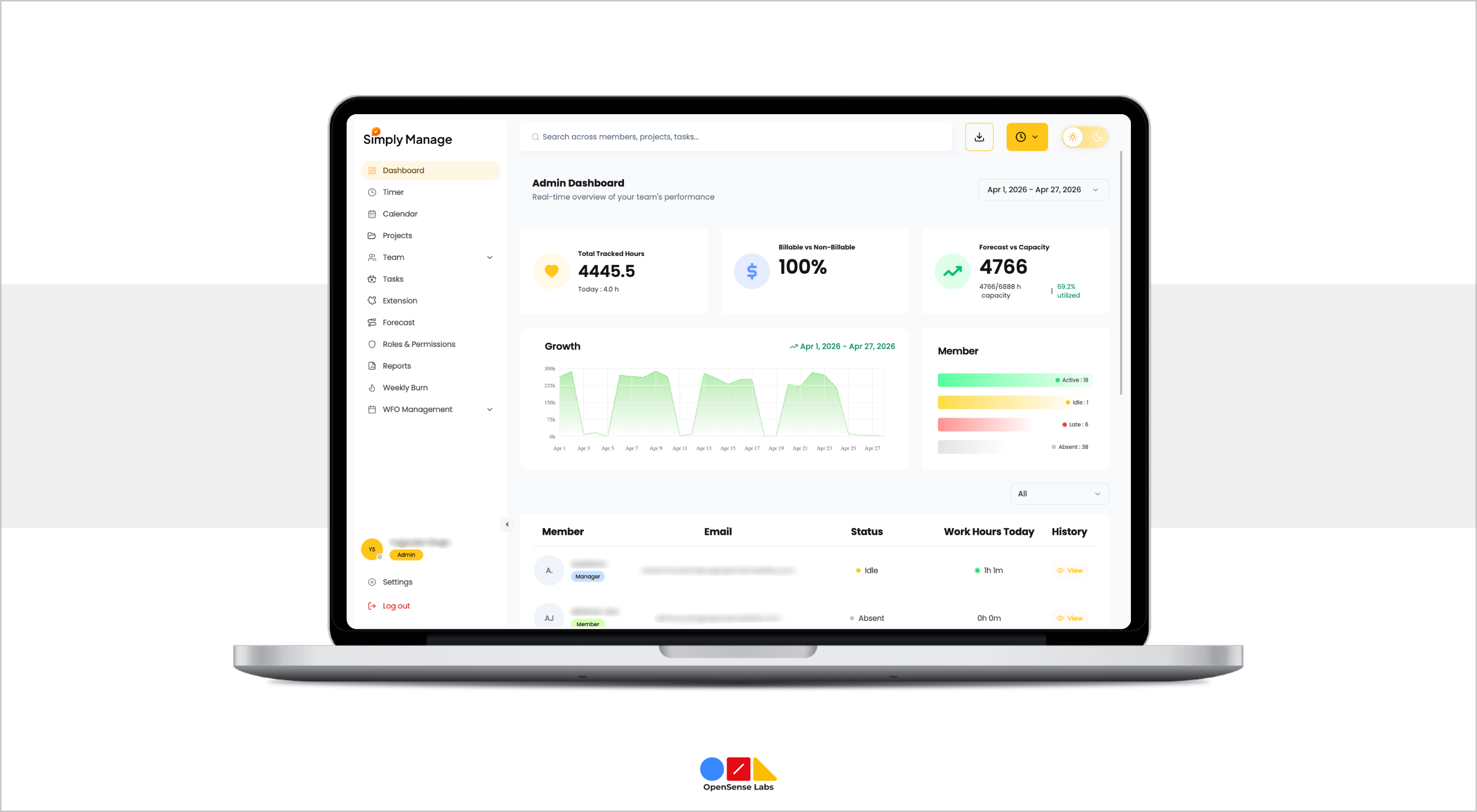
Here are the key components that make Simply Manage a complete workforce management tool:
1. Real-Time Time Tracking
At the core of Simply Manage is a precise, real-time tracking engine. Employees simply have to start and stop timers with a single click, and the system takes care of the rest.
How It Works
- Live Timer: Click Start when beginning a task; click Stop when done.
- Auto-Logging: Records of project, task, description, billable status, and tags automatically.
- Conflict Alerts: Warns employees if they try to start a second timer without stopping the first.
- Multi-Platform: Track via the web app, browser extension, or the upcoming mobile app.
To protect data integrity, only managers can add, edit, or delete time entries on behalf of team members. Employees use the live timer only. This eliminates time manipulation and keeps records audit-ready at all times.
2. Visual Resource Forecasting & Allocation
The Forecast module is Simply Manage's standout feature. It gives managers a bird's-eye view of who is working on what, and when - letting them plan resources weeks or months using an interactive drag-and-drop calendar. It aligns with workforce planning best practices by combining planning, tracking, and reporting in a single system. The forecasting module supports strategic workforce planning by giving managers a clear view of future resource needs.
Key Capabilities
- Visual Calendar: Color-coded blocks show each person's project assignments across days and weeks.
- Drag & Drop: Create, move, extend, or shorten allocations by simply dragging blocks.
- Over-Allocation Alerts: Red highlights and warnings appear when someone is assigned beyond their daily capacity.
- Bulk Allocation: Select a date range and allocate multiple days in a single action.
- Detailed Entries: Specify the project, hours per day, date range, and optional notes per allocation.
- Allocation History: Full change history on every allocation - see who changed what and when, with context on dates and entity names.
Simply Manage outperforms spreadsheets. Resource planning in spreadsheets is often error-prone, lacks real-time collaboration, and quickly becomes unmanageable as teams scale.
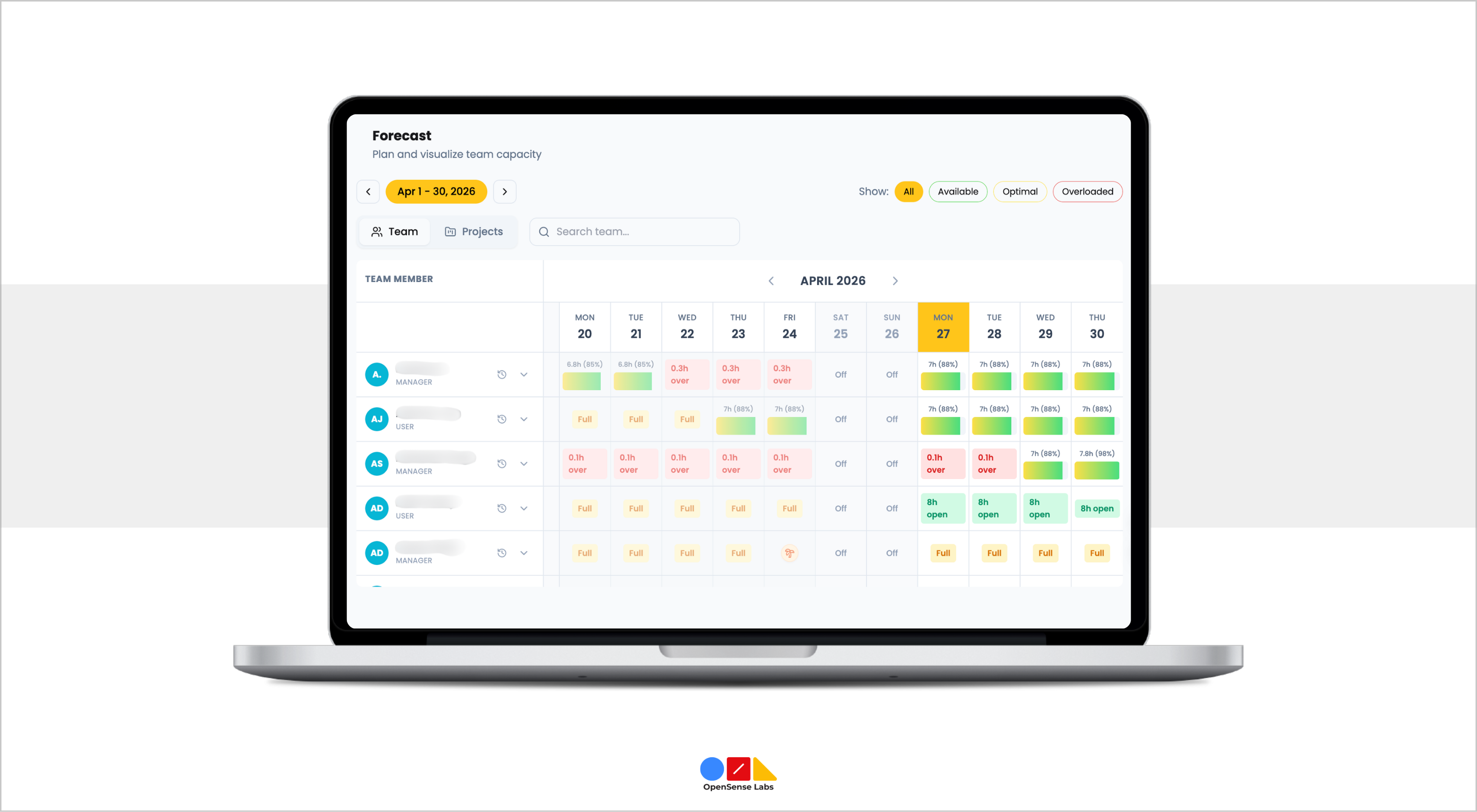
In contrast, Simply Manage updates forecasts in real time, instantly reflects changes across teams, and flags conflicts the moment they arise, capabilities that spreadsheets simply can’t match.
3. Advanced Reporting & Analytics
Many organizations struggle with scattered time data, limited visibility, and manual reporting, making it difficult to track performance, measure utilization, or make informed business decisions.
It solves this by transforming raw time data into actionable business intelligence. With fully filterable and exportable reports, you get real-time insights into team performance, project health, and overall profitability. These insights help in workforce management optimization, helping teams improve efficiency and reduce operational gaps.
| Types of Reports | What it Shows |
|---|---|
| Summary Report | Total hours per project; billable vs. non-billable split; hours per team member |
| Detailed Report | Every individual time entry with full details - ideal for client invoicing |
| Utilization Report | Capacity vs. tracked hours - identifies over- and under-utilized people |
| Profitability Report | Revenue (billable hours x rates) vs. costs (hours x cost rates) |
| Overtime Report | Hours worked beyond the standard workday, broken down per employee |
4. Key Business Metrics Simply Manage Tracks
Without the right metrics, workforce management becomes a guessing game. It brings clarity by continuously tracking the metrics that define performance, efficiency, and business impact. Tracking these metrics enables continuous workforce management optimization by identifying inefficiencies early.
| Metric | What it Measures | Why it Matters |
|---|---|---|
| Billable Utilisation | % of time that is billable | Directly tied to revenue potential |
| Total Utilisation | % of capacity actively used | Measures overall team efficiency |
| Project Budget Burn | Hours used vs. hours budgeted | Early warning on project overruns |
| Overtime Hours | Hours beyond the standard workday | Guards against team burnout |
| Allocation Accuracy | Planned hours vs. actual hours | Shows forecasting effectiveness |
| Resource Availability | Unallocated capacity remaining | Highlights planning opportunities |
5. Work-From-Office (WFO) Tracking
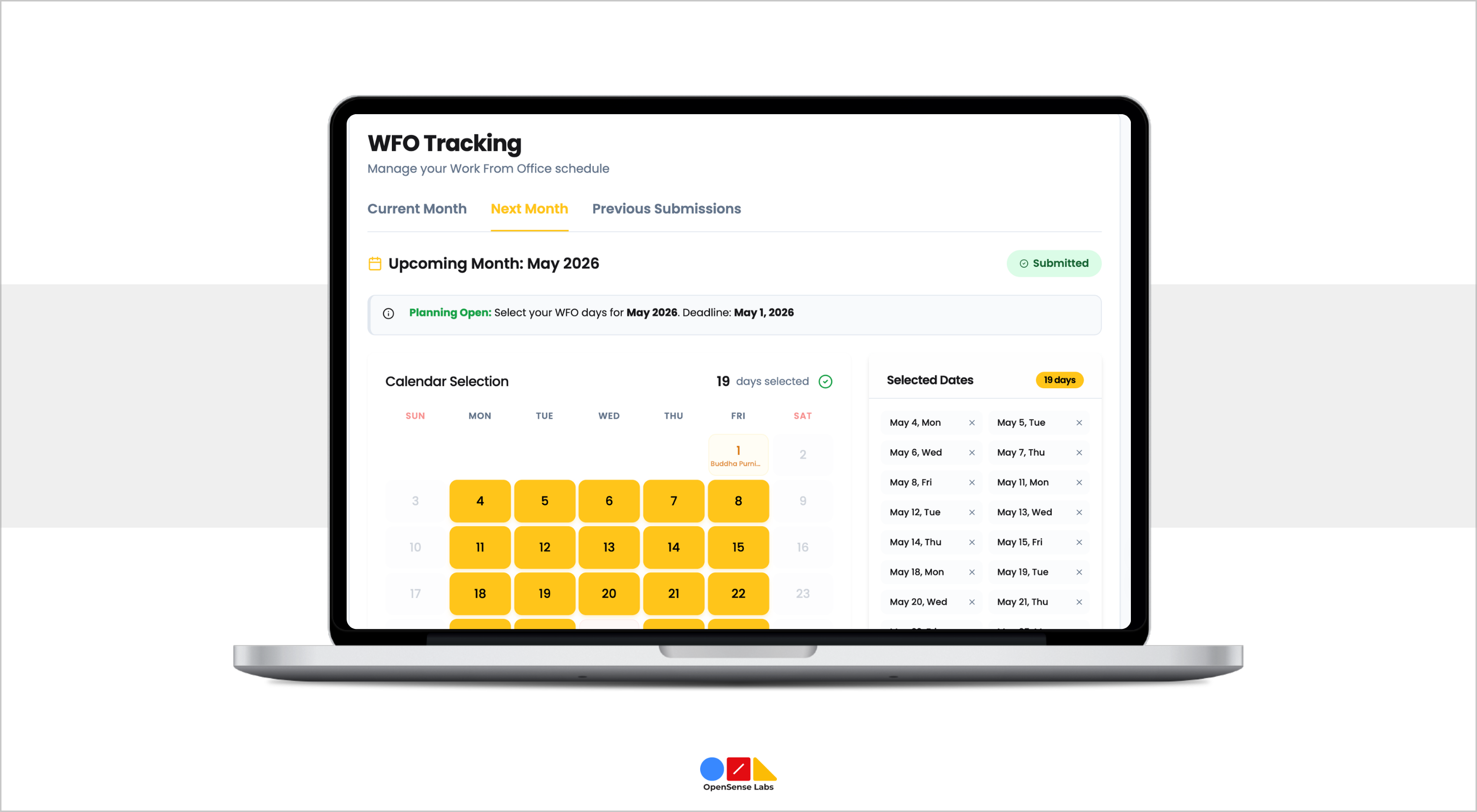
It includes a dedicated WFO/WFH tracking module that helps HR and managers understand office attendance patterns.
- Work-from-Office Scheduling: Employees log or plan their work-from-office days each month, giving teams clear visibility to align schedules and collaborate in-office on common days.
- Lock & Override: Submissions lock at month-end; admins can override with a documented reason.
- Excel Export: Fully formatted Excel sheets, department-grouped with daily presence (P) markers, weekend shading, and a Team Capacity summary row.
- Statistics: Organization-wide WFO stats with per-department breakdowns.
- Role-Scoped: Managers see only their direct reports; admins see the full organization.
6. Project & Client Management
Managing projects and clients in isolation often leads to disconnected workflows, inaccurate billing, and limited visibility into performance. But this workforce management tool brings it all together in a unified system, where every project is directly linked to clients, budgets, and team efforts, ensuring better coordination, real-time tracking, and complete financial clarity.
Projects Management
- Every tracking hour belongs to a project. Projects are the organizational backbone of Simply Manage.
- Set a budget for hours or money; get alerts when approaching the limit.
- Assign billing rates, project lead, start/end dates, and team members.
- View real-time budget burn vs. estimated hours.
- Structure works with tasks nested inside each project.
Clients Management
- Simply Manage stores a rich client database that ties directly to billing and reporting.
- Company name, contact person, email, billing address, tax/VAT number.
- Payment terms (e.g., Net 30) and preferred currency per client.
- Filter reports by client to generate accurate invoices without extra tools.
- Track profitability per client over time.
7. Integrations & Extensions
To fit seamlessly into existing workflows, Simply Manage integrates with the tools your teams already rely on, ensuring smooth data flow, minimal manual effort, and uninterrupted productivity.
Here are the integrations and extensions that enhance your Simply Manage experience:
Jira Integration
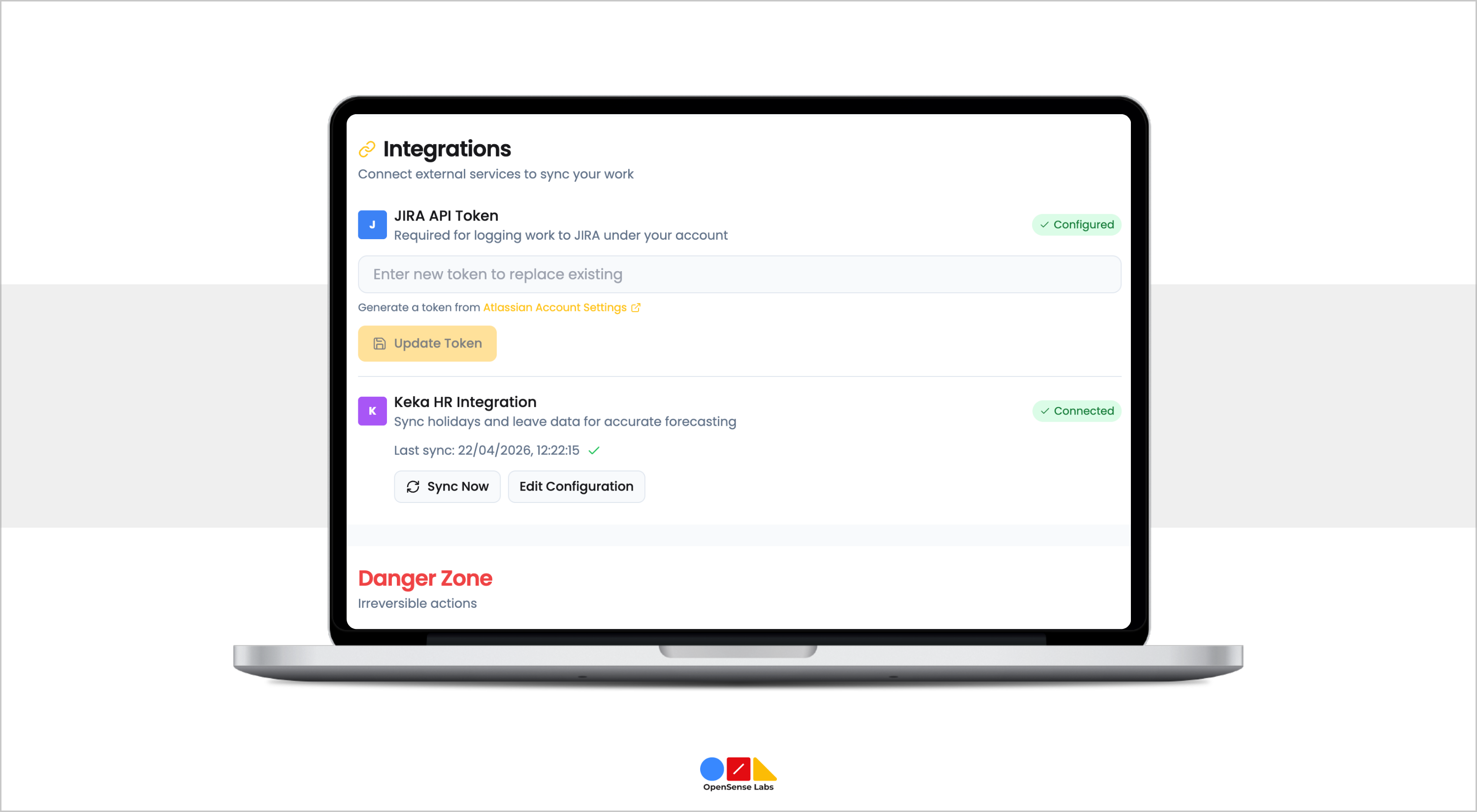
For software teams already working in Jira, it offers seamless two-way synchronization, so time is tracked once and reflected everywhere.
- Setup: Admin connects via secure OAuth and selects Jira projects to sync.
- Auto-Sync: Jira projects and issues automatically appear in Simply Manage.
- Two-Way Sync: Log time in Simply Manage or Jira, and both stay updated.
- Issue Visibility: Track time against Jira tickets without leaving your workflow.
Keka HR Integration
It integrates with Keka to automatically sync holidays and leave data, eliminating manual effort and improving visibility.
- Setup: Connect using Client ID, Client Secret, and API Key.
- Holiday & Leave Sync: Scheduled automatic syncing of holidays and approved leaves.
- Real-Time Webhooks: Instant updates for leave events (created, approved, rejected, cancelled).
- Leave Visibility: Managers can view and export team leave data.
- Manual Sync: Trigger sync anytime from the admin panel.
Browser Extension
The Simply Manage browser extension brings time tracking directly into your daily tools available for Chrome, Firefox, and Edge.
- Jira Integration: One-click timer directly from Jira issue pages.
- Extension Popup: Manage timers, switch projects, and view stats instantly.
- Offline Mode: Track time without internet; auto-sync when reconnected.
- Smart Alerts: Reminders for stopping timers and preventing tracking gaps.
Best Workforce Management Tools Compared (Simply Manage vs Others)
Most workforce management tools do one or two things well. Simply Manage is purpose-built to cover the full spectrum, from the moment a project is planned to the moment a client is billed.
The comparison below highlights how Simply Manage brings together capabilities that are otherwise scattered across multiple tools, giving teams a single, unified platform instead of fragmented solutions.
| Feature | Toggl / Clockify | Harvest | Float / Resource Guru | Simply Manage |
|---|---|---|---|---|
| Real-time time tracking | Yes | Yes | No | Yes |
| Visual resource forecasting | No | No | Yes | Yes |
| Drag-and-drop allocation | No | No | Yes | Yes |
| Allocation change history | No | No | No | Yes |
| Attendance tracking | No | No | No | Yes |
| WFO / Hybrid work tracking | No | No | No | Yes |
| Keka HR integration | No | No | No | Yes |
| Jira two-way time sync | Limited | No | No | Yes |
| Browser extension | Yes | No | No | Yes |
| Server-side PDF reports | No | Yes | No | Yes |
| Excel export with charts | No | No | No | Yes |
| Billable + cost rate tracking | No | Yes | No | Yes |
| Role-based data isolation | Yes | Yes | Yes | Yes |
The Future of Workforce Management Starts Here...
A modern workforce management tool is way more than just tracking time; it brings clarity to complexity, aligns teams, and enables smarter real-time decision-making.
As organizations' scale and workflows become more dynamic, relying on disconnected tools or manual processes only adds friction. What teams need is a unified system that tracks, connects planning, execution, and reporting seamlessly.
Manage delivers exactly that. From time tracking and resource planning to reporting, integrations, and team coordination, it brings everything together in one place, giving leaders the visibility and control they need to run efficient, high-performing teams.
Discover how a unified workforce management tool can transform the way your team plans, tracks, and delivers work.

Join Our Newsletter
Love open-source tech? Stay updated with projects that make a difference.